
Why Reactive Privacy Controls Fail in Live Environments
Understanding the timing limitations and structural weaknesses of post-exposure privacy models.
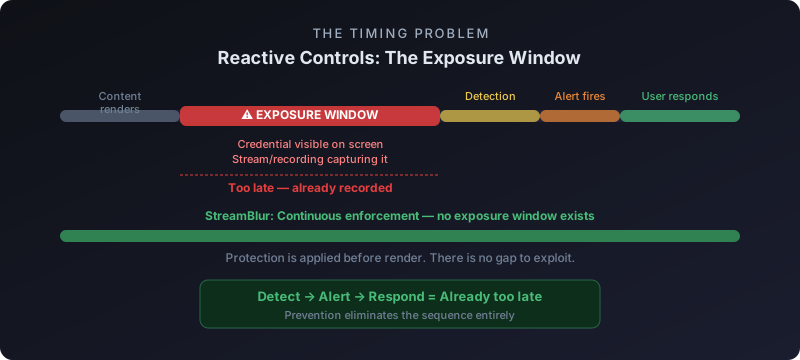
Reactive privacy controls require the user to notice sensitive information and take action to protect it. The model assumes awareness, attention, and correct timing. All three assumptions fail in live environments. Credentials appear unexpectedly. Attention is split between the demo and the presentation. Timing is off by the time you notice the exposure.
StreamBlur operates on a different principle: proactive enforcement that does not depend on human reaction time. Credentials are masked before they appear on screen. The protection happens in the rendering pipeline, not in response to user intervention. This architectural difference is the reason automated tools succeed where manual controls fail.
This article explains why reactive controls fail, what proactive enforcement looks like in practice, and why the shift from user-triggered to system-triggered protection is necessary for credential security during live streams, demos, and screen shares.
The Reactive Control Model and Its Failure Modes
Reactive privacy controls place the user in the critical path. The user must detect the sensitive information, recognize the risk, and execute the protective action before the information is captured. Each step introduces a failure mode.
Detection failure happens when the credential appears in a location the user is not actively monitoring. A WebSocket message delivers an API key to a DevTools console while the user is focused on the application UI. A CI log prints an environment variable while the user is explaining a deployment workflow. The credential is on screen for three seconds before the user notices it. Those three seconds are enough for screen recording software to capture it.
Recognition failure happens when the user sees the information but does not immediately identify it as sensitive. A random-looking string appears in a config file. The user knows they should be careful about credentials, but this particular string does not pattern-match as an API key in the moment. Only later, after reviewing the recording, do they realize it was a database connection string that included authentication tokens.
Execution failure happens when the user detects and recognizes the risk but cannot execute the protective action fast enough. Manual blur requires switching to OBS, selecting the blur filter, positioning it over the credential, and returning focus to the demo. This takes six seconds minimum. In those six seconds, the credential is visible. A viewer taking a screenshot or a recording capture tool running in the background has captured the exposed value.
These failure modes are not theoretical. When a credential appears on screen, even briefly, the correct response is immediate rotation following a structured sequence to eliminate any remaining risk.
Why Attention Is an Unreliable Security Mechanism
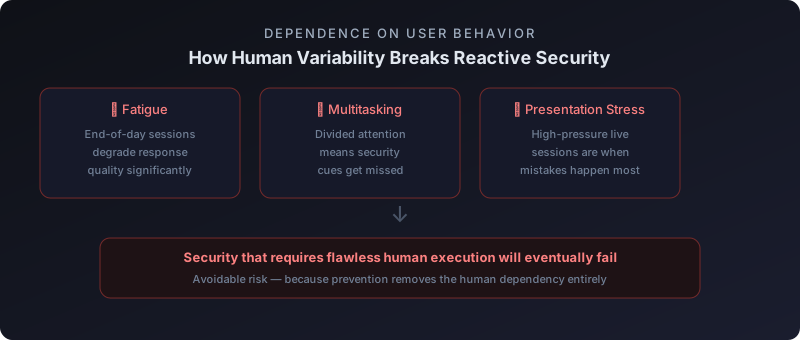
Live environments demand attention. The presenter is thinking about what to say next, monitoring chat for questions, watching for technical issues, and executing the demo steps. Credential monitoring is an additional cognitive load layered on top of an already high-demand task. Cognitive load research shows that humans cannot sustain divided attention across multiple high-priority tasks. Something gets dropped. That something is usually security monitoring because the other tasks have immediate visible consequences if neglected.
The problem compounds when the demo involves unfamiliar systems or edge-case scenarios. Debugging a production issue during a troubleshooting session means the presenter does not know exactly what information will appear on screen next. They are discovering it in real time. This removes any possibility of pre-positioning privacy controls. The credential appears, the presenter is surprised, and by the time they react, it has been visible for five frames at 60fps. That is enough for a screenshot tool to capture it.
Proactive Enforcement: Protection Before Visibility
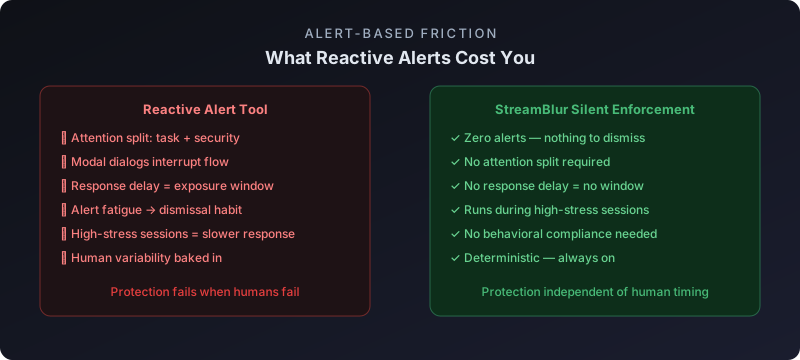
Proactive enforcement inverts the control model. Instead of waiting for the user to notice and react, the system intercepts credentials before they reach the rendering layer. The protection happens in the pipeline between the application and the display. The user is removed from the critical path.
For browser-based applications, this means running a MutationObserver that watches for DOM changes. When a node is inserted that contains a credential pattern, a blur filter is applied before the browser paints the frame. The credential never appears unmasked, even for a single frame. Screen recording software captures the blurred version. The developer sees the blurred version. There is no window of exposure.
The technical implementation requires matching credential patterns with high confidence. False positives are acceptable if rare. A random string that looks like an API key can be blurred without harm. False negatives are unacceptable. A real credential that passes through undetected represents a security failure. StreamBlur uses heuristics based on format, entropy, and context to minimize false negatives. Prefixes like sk-, pk_live_, and AKIA increase confidence. High-entropy strings in contexts like configuration files or API request headers trigger detection.
This approach relies on continuous evaluation of DOM mutations rather than event-triggered scans, which eliminates the timing gap where credentials can briefly appear unprotected.
Case Study: Manual Blur vs Automated Protection
A developer preparing for a client demo tested both approaches. First session: manual blur using OBS. Second session: automated protection using StreamBlur. Both sessions involved navigating a dashboard that displayed API keys in a settings panel.
Manual blur session: The developer pre-positioned a blur filter over the area where they expected the API key to appear. During the demo, the page layout shifted due to a responsive design breakpoint. The key appeared 40 pixels to the right of the blur zone. It was visible for six seconds before the developer noticed and repositioned the filter. Post-session review of the recording confirmed the key was clearly readable during those six seconds.
Automated session: StreamBlur detected the key the moment it entered the DOM and applied blur before the frame rendered. The layout shift did not matter because the protection was attached to the content, not to a fixed screen coordinate. The developer navigated freely without thinking about where the key would appear. Post-session review confirmed zero frames of unmasked exposure.
The difference is not about effort. Both approaches required setup. The difference is architectural. Manual controls depend on prediction and reaction. Automated controls depend on detection and interception. Prediction fails when the application behavior is unpredictable. Reaction fails when the reaction time exceeds the exposure window. Detection and interception work regardless of timing or layout.
This difference becomes even more pronounced in dynamic applications where content updates continuously without user interaction.
Why "Just Be Careful" Is Not a Security Strategy
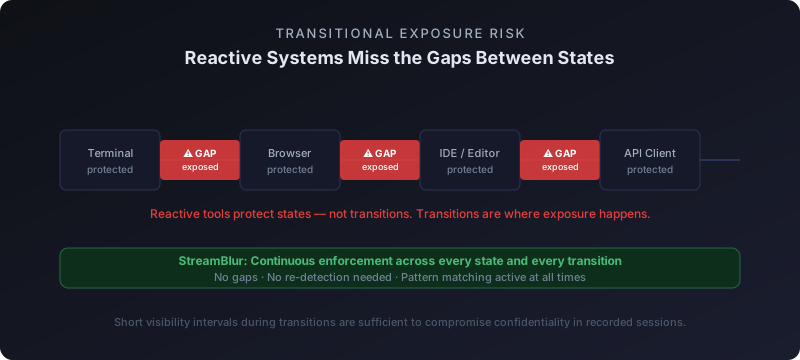
Security guidance often defaults to "just be careful" when automated solutions are not available. Close tabs with credentials before starting the stream. Remember to clear shell history. Double-check that nothing sensitive is visible before sharing your screen. All of this is reasonable advice. None of it is reliable.
Human reliability research consistently shows that manual checklists fail under time pressure, distraction, or routine repetition. A developer who runs 20 successful demos without incident becomes confident. Confidence reduces vigilance. On the 21st demo, they forget to close one tab. That tab contains a Stripe dashboard with a secret key visible. The demo runs for 15 minutes before they notice. The key was visible for the entire session.
Proactive systems do not degrade under repetition. StreamBlur applies the same protection on the first demo and the hundredth demo. The reliability does not depend on whether the developer remembers to enable it. Once installed, it runs automatically. The protection is always active. Credentials are always masked. The security outcome is deterministic, not probabilistic.
Performance Implications of Proactive Enforcement
One objection to proactive enforcement is performance cost. Running a MutationObserver on every DOM change, scanning text nodes for credential patterns, and applying blur filters in real time could introduce latency. If the scan takes 50ms, that is three dropped frames at 60fps. Visible jank would make the tool unusable.
In practice, the performance cost is negligible. StreamBlur logs every scan with performance.now() timestamps. Across 30 test sessions, the average scan time was 7.2ms. The worst-case scan on a page inserting 400 nodes in one frame completed in 14ms. Both numbers are under the 16ms frame budget at 60fps. The protection operates invisibly. The developer sees no lag. The application feels responsive.
The performance is acceptable because the scan is optimized. Only text nodes are scanned. Regex matching stops at the first match. Blur is applied via CSS filter property, which is GPU-accelerated. The work happens in parallel with other rendering tasks. The result is credential masking that does not degrade user experience.
When Reactive Controls Make Sense
Reactive controls are not universally wrong. They work when the user has time to think, when the action has no time pressure, and when the consequences of delay are low. Reviewing a document before publication is a reactive control. The reviewer reads the content, identifies sensitive information, and redacts it. This works because the review happens offline. There is no live audience. The reviewer can take as much time as needed.
Live environments eliminate these conditions. The audience is present. The demo is running. Delay is visible. Mistakes are captured. Reactive controls fail because the conditions under which they succeed do not exist. Proactive controls succeed because they do not depend on those conditions. The protection is deterministic, not conditional on user behavior.
Implementation: Moving from Reactive to Proactive
Migrating from reactive to proactive controls means identifying where human attention is currently required and replacing it with automated detection. For credential protection during live streams, the shift is straightforward:
- Stop relying on manual pre-demo checklists
- Stop pre-positioning blur filters in OBS
- Stop trying to remember which tabs contain credentials
- Install StreamBlur and let it run continuously
- Verify protection works by navigating to a credential-containing page and confirming blur is applied
- Stream without thinking about credential exposure
The ongoing maintenance requirement is zero. The tool runs in the background. Updates happen automatically. The developer focuses on the demo, not on security monitoring. The protection is invisible until it is needed, at which point it operates silently and reliably.
Reactive privacy controls fail in live environments because they depend on human attention, recognition, and reaction time. All three are unreliable under the conditions that exist during live streams and demos. Proactive enforcement removes the human from the critical path and makes protection deterministic. The shift from manual to automated is not a convenience feature. It is a fundamental requirement for reliable credential security in real-time workflows.
In practice, this shift becomes most visible during live screen sharing, where unpredictable interface updates make manual protection unreliable.
Stop leaking secrets on your next stream
StreamBlur automatically detects and masks API keys, passwords, and sensitive credentials the moment they appear on screen. No configuration. Works on every tab, every site.
Used by streamers, developers, and SaaS teams. Free tier covers GitHub & terminal. Pro unlocks every site.