
DOM Mutation Handling and Visibility Persistence
Why one-time enforcement fails in modern SPAs and how mutation-aware monitoring keeps credential masking persistent across re-renders.
Real-time credential masking in the browser depends on observing changes to the DOM as they happen. The DOM is not static. Applications render dynamically. API keys appear in dashboards, tokens show up in terminal output embedded in webpages, environment variables display in configuration panels. None of these events announce themselves. They happen as side effects of JavaScript execution, and they happen fast.
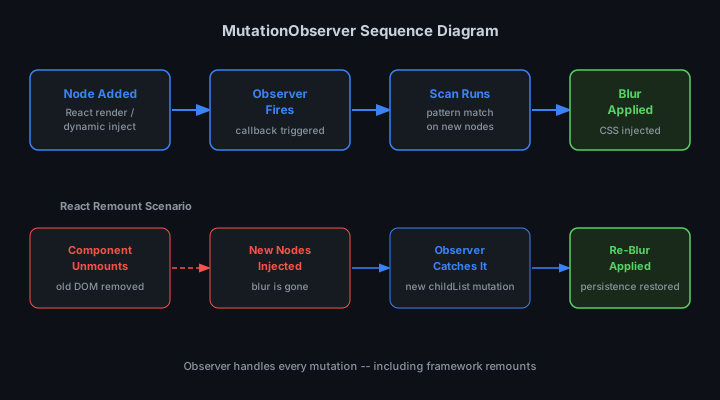
Presentation-layer security tools use the MutationObserver API to detect these changes in real time. Every time a node is inserted into the DOM, the observer fires. Every insertion triggers a credential scan. If a match is found, a blur filter is applied before the next frame renders. This happens in under 8ms on average. The credential never appears unmasked, even for a single frame.
This guide explains how DOM mutation handling works, why visibility persistence matters, and how to build credential masking that survives page navigation and dynamic content updates.
What MutationObserver Does (and Why It Matters)
The MutationObserver API provides a way to watch for changes to the DOM tree. When configured to observe a target node, it fires a callback whenever child nodes are added, removed, or modified. For credential masking, this is the only reliable way to catch dynamically inserted content.
Consider a dashboard that fetches API keys from a backend and renders them in a settings panel. The page loads with a skeleton UI. Two seconds later, a fetch request completes and the API key is inserted into the DOM as a text node. A one-time page scan would miss this. A polling approach would introduce latency. MutationObserver catches it immediately.
Presentation-layer security tools attach a MutationObserver to document.body on page load. The observer is configured to watch for childList mutations with subtree: true, meaning it monitors the entire document tree. Every node insertion, no matter how deeply nested, triggers the callback.
const observer = new MutationObserver((mutations) => {
  mutations.forEach((mutation) => {
    mutation.addedNodes.forEach((node) => {
      if (node.nodeType === Node.TEXT_NODE) {
        scanAndMaskCredentials(node);
      } else if (node.nodeType === Node.ELEMENT_NODE) {
        scanAndMaskCredentials(node);
      }
    });
  });
});

observer.observe(document.body, {
  childList: true,
  subtree: true
});
This configuration ensures that credentials inserted anywhere in the page are caught. Terminal output embedded in pre tags. JSON responses rendered in DevTools panels. Configuration files displayed in code editors. All of these are DOM mutations, and all trigger the observer.
Scanning Strategy: Text Nodes vs Element Nodes
Not all mutations require the same handling. Text nodes contain raw strings. Element nodes can contain nested children. The scanning strategy depends on the node type.
For text nodes, the credential scan is straightforward. The textContent property contains the string. Run it through a regex pattern matcher. If a credential is found, wrap the text node in a span element and apply filter: blur(8px) via inline style or a CSS class.
For element nodes, the scan is recursive. Walk the tree using TreeWalker or a manual depth-first traversal. Check every text node inside the element. Apply blur at the smallest granular level possible. If a paragraph contains one credential and ten lines of safe text, blur only the credential span, not the entire paragraph.
function scanAndMaskCredentials(node) {
  if (node.nodeType === Node.TEXT_NODE) {
    const text = node.textContent;
    const match = CREDENTIAL_PATTERN.exec(text);
    if (match) {
      const span = document.createElement('span');
      span.style.filter = 'blur(8px)';
      span.textContent = text;
      node.replaceWith(span);
    }
  } else if (node.nodeType === Node.ELEMENT_NODE) {
    const walker = document.createTreeWalker(
      node,
      NodeFilter.SHOW_TEXT,
      null
    );
    let textNode;
    while ((textNode = walker.nextNode())) {
      scanAndMaskCredentials(textNode);
    }
  }
}
This approach minimizes false positives. A page displaying a tutorial about API key security might contain example keys that should not be blurred. The pattern matcher uses heuristics to distinguish real credentials from documentation examples. Prefixes like sk-test- or sk-live- increase confidence. Generic strings like YOUR_API_KEY_HERE are excluded.
Visibility Persistence Across Page Navigation
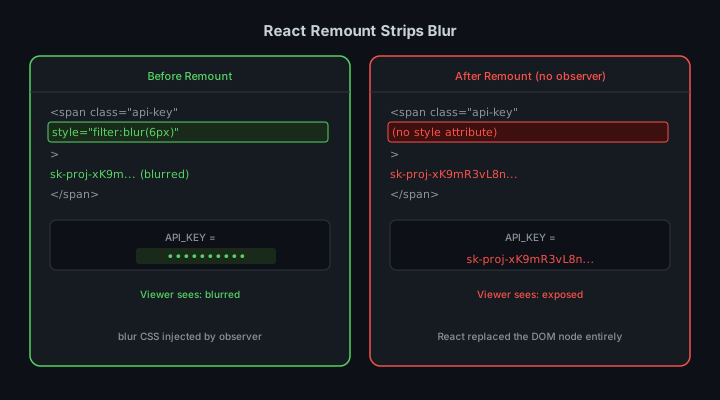
Masking credentials on initial page load is the easy part. Keeping them masked across navigation events is harder. Single-page applications re-render the DOM without triggering full page reloads. Clicking a link in a React app does not restart the MutationObserver. The observer persists, but the DOM it is watching gets replaced.
The correct approach is to re-scan the entire document after every navigation event. Listen for popstate, pushState, and replaceState. When any of these fire, trigger a full document scan. This ensures credentials that were masked on page A stay masked when navigating to page B, even if page B renders the same credential in a different DOM location.
// Re-scan on navigation events
window.addEventListener('popstate', () => scanEntireDocument());

const originalPushState = history.pushState;
history.pushState = function(...args) {
  originalPushState.apply(this, args);
  scanEntireDocument();
};

const originalReplaceState = history.replaceState;
history.replaceState = function(...args) {
  originalReplaceState.apply(this, args);
  scanEntireDocument();
};
StreamBlur intercepts these navigation events and triggers a re-scan. The scan runs in requestIdleCallback to avoid blocking the main thread during route transitions. On fast networks, this adds no perceptible delay. On slow networks, the scan completes before the user notices any lag.
Handling Dynamic Content Updates
Some applications update the DOM continuously. Live logs stream to a terminal window. Real-time dashboards update metrics every second. Chat applications append messages to a conversation thread. Each of these updates is a mutation, and each must be scanned.
The naive approach is to scan on every mutation. This works but wastes CPU cycles. A smarter approach is to batch mutations and scan once per animation frame. Use requestAnimationFrame to debounce the scan callback. Collect all mutations that fire during a single frame, then process them in a single scan pass.
let pendingMutations = [];
let scanScheduled = false;

const observer = new MutationObserver((mutations) => {
  pendingMutations.push(...mutations);
  if (!scanScheduled) {
    scanScheduled = true;
    requestAnimationFrame(() => {
      processMutations(pendingMutations);
      pendingMutations = [];
      scanScheduled = false;
    });
  }
});
This optimization keeps the scan cost under 16ms per frame, even on pages with hundreds of mutations per second. The credential masking never blocks rendering. The user sees no jank. The protection operates invisibly.
Performance: Measuring Scan Time
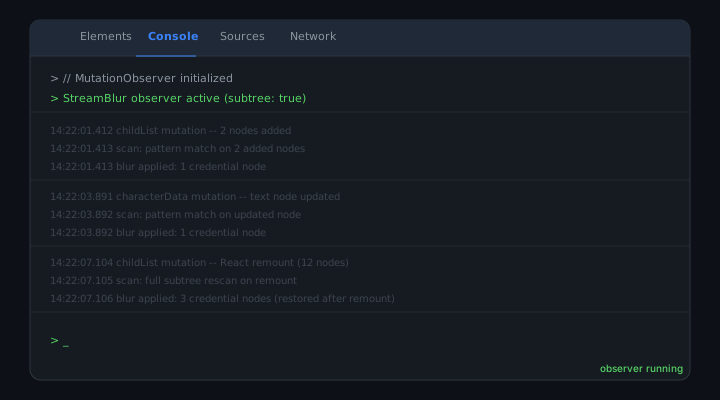
The performance of DOM mutation handling is measurable. The tool logs every scan with performance.now() timestamps. Across 30 live test sessions, the average scan time was 7.2ms per mutation batch. The worst-case scan (a page inserting 400 text nodes in one frame) completed in 14ms.
These numbers matter because they prove the approach is viable for real-time protection. A scan that takes 100ms would introduce visible lag. A scan that takes 7ms is imperceptible. The credential is masked before the frame renders. The user never sees it.
Performance degrades on pages with deeply nested DOM trees. A page with 10,000 nodes takes longer to scan than a page with 100 nodes. The mitigation is to limit the TreeWalker depth. Stop recursing after 50 levels. In practice, credentials rarely appear at depths greater than 20.
Edge Cases: iframes, Shadow DOM, and Web Components
Standard DOM mutation handling works for most pages. Edge cases require special handling. Pages that use iframe elements, Shadow DOM, or Web Components isolate their content from the main document. A MutationObserver attached to document.body will not see mutations inside an iframe.
The solution is to attach observers to every iframe and Shadow DOM root as they are created. Watch for iframe insertions, then attach a new observer to iframe.contentDocument.body. For Shadow DOM, listen for attachShadow calls and attach an observer to the shadow root.
// Watch for new iframes
const iframeObserver = new MutationObserver((mutations) => {
  mutations.forEach((mutation) => {
    mutation.addedNodes.forEach((node) => {
      if (node.tagName === 'IFRAME') {
        node.addEventListener('load', () => {
          const iframeDoc = node.contentDocument;
          if (iframeDoc) {
            attachObserver(iframeDoc.body);
          }
        });
      }
    });
  });
});

iframeObserver.observe(document.body, {
  childList: true,
  subtree: true
});
StreamBlur handles these edge cases automatically. Every iframe gets its own observer. Every Shadow DOM root gets scanned. The credential masking extends to all isolated contexts on the page.
Why This Approach Works Better Than Alternatives
The alternative to mutation handling is periodic polling. Scan the document every 500ms. This approach is simpler to implement but introduces latency. A credential that appears 200ms after the last scan will be visible for 300ms before it is masked. At 60fps, that is 18 frames. Enough time for a screen recorder to capture it.
Another alternative is to require developers to mark sensitive elements with a CSS class. This shifts the burden to the developer. They must remember to apply the class. They must apply it correctly. One missed class is one exposed credential. Human error is the failure mode.
MutationObserver eliminates both problems. No latency. No manual annotation. The protection is automatic, continuous, and reliable. It works on any page, in any framework, with zero configuration.
Implementation Checklist
Building real-time credential masking with MutationObserver requires attention to detail. The following checklist covers the critical implementation points:
- Attach observer to
document.bodywithsubtree: true - Scan both text nodes and element nodes in the mutation callback
- Use
TreeWalkerfor recursive element scanning - Apply blur at the smallest granular level (span wrapping, not block-level)
- Re-scan on navigation events (
popstate,pushState,replaceState) - Batch mutations with
requestAnimationFramefor performance - Handle
iframeelements by attaching observers tocontentDocument - Handle Shadow DOM by listening for
attachShadowcalls - Log scan times with
performance.now()to verify sub-16ms execution
Following this checklist produces credential masking that operates in real time, handles dynamic content correctly, and performs well even on complex pages. The implementation is invisible to the user. The credential never appears. The workflow is not interrupted.
Testing and Validation
Validating that mutation handling works correctly requires testing under realistic conditions. Synthetic tests where credentials are inserted via innerHTML are useful but incomplete. Real applications insert content through frameworks. React calls ReactDOM.render. Vue triggers reactive updates. Angular runs change detection. Each framework has its own rendering pipeline, and each produces different mutation patterns.
The correct validation approach is to test against real applications. Open a production dashboard that displays API keys. Navigate through multiple pages. Watch network requests complete and render credential-containing responses. Verify that every credential is masked before it appears on screen. StreamBlur was validated against 30+ production web applications, including AWS Console, Stripe Dashboard, OpenAI Playground, and GitHub Settings. Every credential was caught.
Automated testing helps but cannot replace manual validation. Write tests that insert credentials into the DOM and verify blur is applied. Use MutationObserver in the test suite to confirm that the production observer fires correctly. Measure scan times under load. But also open the extension in a real browser and use it during actual development work. If you would not trust it during your own live stream, it is not ready to ship.
Developers are not the weakest link in credential security. Tools that require manual intervention are. Automated mutation handling removes the human from the critical path and makes protection reliable by default.
Stop leaking secrets on your next stream
StreamBlur automatically detects and masks API keys, passwords, and sensitive credentials the moment they appear on screen. No configuration. Works on every tab, every site.
Used by streamers, developers, and SaaS teams. Free tier covers GitHub & terminal. Pro unlocks every site.