
Discord Screen Share vs OBS Capture: What Twitch Viewers Actually See
A technical breakdown of Discord screen sharing, OBS capture methods, and privacy exposure during live streaming
Twitch streamers often run Discord, OBS, browsers, and SaaS dashboards simultaneously. During live gameplay or community interaction, it is common to alt-tab between applications, check DMs, review analytics dashboards, or manage moderators in Discord server settings.
Many creators assume that if a window is minimized, cropped in OBS, or visible for only a second, it will not be recorded. In reality, once content is rendered to the screen, it is eligible to be captured and streamed to thousands of viewers in real time. The captured frame is encoded, transmitted to Twitch ingest servers, and becomes part of the permanent broadcast record.
Understanding how Discord screen share works versus OBS capture is critical for managing privacy risk on Twitch. This guide explains the technical mechanisms behind both capture methods, common misconceptions that lead to accidental exposure, and practical steps to prevent sensitive information from appearing on stream.
How Discord Screen Share Works (Go Live vs Screen Share)
Discord offers two primary streaming methods for voice channels and direct messages: Go Live (designed for games and applications) and Screen Share (designed for desktop sharing and collaboration). Both methods follow the same capture rules at the operating system level, but they are optimized for different use cases.
Go Live is typically used for streaming games to friends or community members within a Discord server. It allows up to 50 viewers in standard servers and more in partnered or boosted servers. Screen Share is used for smaller group collaboration, presentations, or troubleshooting sessions with up to 25 participants in a voice channel or group DM.
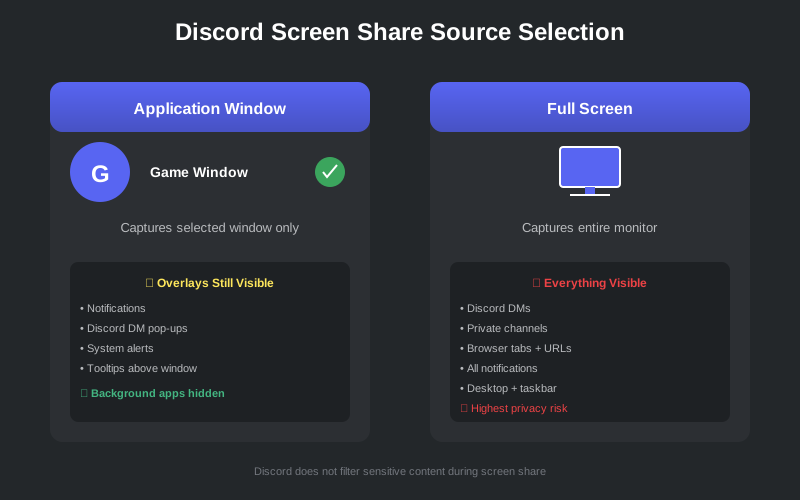
When initiating a Discord stream, you must select a capture source. The available options are:
- Application window capture - captures only the selected application window (e.g., a specific game or browser window)
- Full screen capture - captures everything displayed on the selected monitor, including all windows, taskbar, and desktop icons
If you select a single application window, Discord captures the rendered output of that window only. Other applications running in the background are not transmitted to viewers. However, this isolation is not absolute. Any overlay, notification, tooltip, or pop-up that renders above the selected window will still be captured and transmitted.
For example, if you are streaming a game window and receive a Discord DM notification, that notification overlay will appear on the stream even though you selected "application window" mode. The same applies to system notifications from Slack, email clients, calendar reminders, or any other application that renders pop-ups above the active window.
If you select full screen capture, Discord transmits everything rendered to that monitor display surface. This includes:
- Discord DM previews and full message content from private conversations
- Server channel names, including private channels and role-restricted channels
- Role badges, moderator permissions, and server settings panels
- Browser tabs with visible URL bars showing internal admin panels, staging environments, or API documentation
- Operating system notifications from email, Slack, calendar apps, or security alerts
- Background applications visible during window switches or alt-tab navigation
- Pop-ups, tooltips, autocomplete suggestions, and hover states from any application
- Desktop icons, file names, and taskbar application labels
Discord does not filter sensitive information during screen share. It transmits whatever the operating system renders to that display surface. Privacy filtering, content analysis, or sensitive data detection is not part of Discord's capture pipeline. The application has no awareness of what content is safe to share versus what should remain private.
If sensitive content appears on screen for even a fraction of a second, it can be seen by every viewer in the Discord call. Additionally, screen recording software running on viewer machines may capture the frame for later review, redistribution, or archival. Once transmitted, the streamer has no control over how the content is used or stored by viewers.
How OBS Capture Works for Twitch Streaming
OBS Studio (Open Broadcaster Software) is the most widely used streaming software for Twitch, YouTube, Facebook Gaming, and professional broadcast productions. It is open-source, free, and supports advanced features like scene composition, audio mixing, video filters, and plugin extensions.
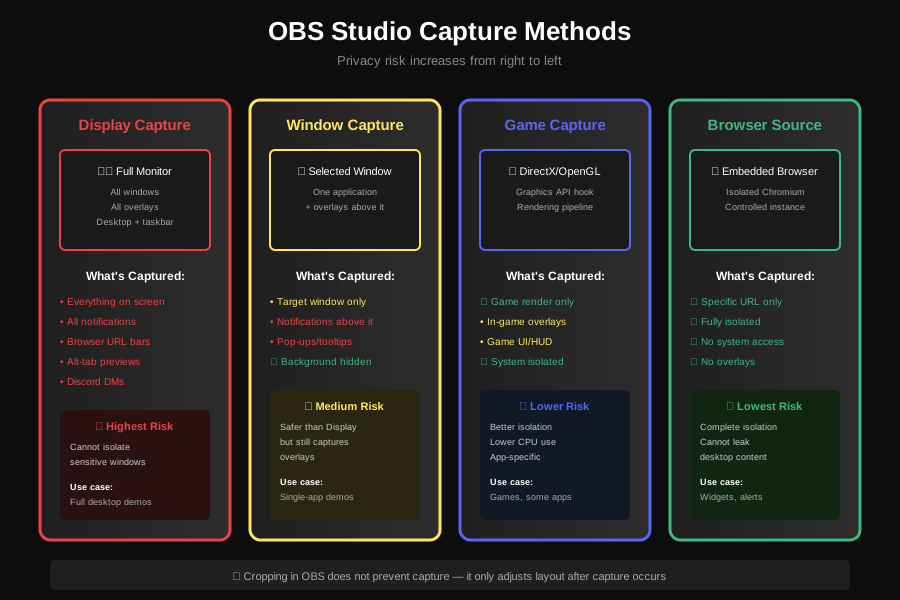
OBS offers multiple capture sources, each with different technical mechanisms and privacy implications:
- Display Capture - records the entire monitor output using desktop duplication APIs or screen capture hooks. This is the highest-risk capture method because it transmits everything visible on the screen, including all windows, notifications, and overlays.
- Window Capture - records a selected application window using window-specific capture hooks. This method is more selective than Display Capture, but still captures any overlays, notifications, or pop-ups that render above the selected window. It does not isolate the window from the rest of the desktop environment.
- Game Capture - hooks directly into a game or application rendering pipeline at the graphics API level (DirectX, OpenGL, Vulkan). This method has lower CPU overhead and better performance, but is limited to applications that expose graphics API hooks. It provides better isolation from overlays, but may still capture in-game overlays, chat windows, or HUD elements.
- Browser Source - embeds a controlled Chromium-based browser instance inside OBS. This is the safest method for displaying web content because the browser instance is isolated from the rest of the system. It is commonly used for stream widgets, alerts, donation notifications, or controlled web panels. However, it cannot capture general desktop applications or games.
For Twitch streaming, OBS captures frames continuously at 30 or 60 frames per second (FPS), depending on stream settings. Each captured frame is encoded using a video codec (typically H.264 or HEVC) and transmitted to Twitch ingest servers via RTMP or enhanced RTMP protocols. The encoded stream is then distributed to viewers in real time with 3-10 seconds of latency.
Once a frame is encoded and transmitted to Twitch, it becomes part of multiple permanent records:
- The live broadcast - visible to all viewers in real time during the stream. Viewer count can range from a few friends to tens of thousands of concurrent viewers for large channels.
- Twitch VOD archives - automatically stored for 14 days (non-partners and affiliates) or 60 days (Twitch Partners). VODs can be deleted manually, but this must be done before the storage period expires.
- Twitch Clips - user-generated highlights that can be created by any viewer during or after the stream. Clips are stored indefinitely and remain publicly accessible even if the original VOD is deleted. Clips can be shared on social media, embedded in websites, or reuploaded to YouTube without the streamer's permission.
- Third-party archives and local recordings - many viewers use screen recording software or third-party VOD archival services to save streams. Some communities maintain unofficial archives of every stream from specific creators. These recordings are outside Twitch's control and may persist indefinitely.
Cropping a source in OBS only adjusts the visual layout of the stream composition. It does not prevent the underlying application from rendering sensitive content within the capture boundary. Cropping is a post-capture transformation applied during scene composition, not a capture-time filter.
This means that fast alt-tabs, hover tooltips, autocomplete suggestions, notification banners, and Discord pop-ups can still be recorded if they render within the original capture area, even if they are later cropped out of the final stream layout. Additionally, if the streamer changes scenes or adjusts the crop region during the stream, previously cropped content may become visible.
OBS captures at the frame level. At 30 FPS, a brief one-second exposure is 30 recorded frames. At 60 FPS, it is 60 frames. Human reaction time for visual recognition is approximately 200-300 milliseconds. By the time a streamer realizes sensitive content is visible and reacts (minimize window, change scene, cover the screen), 6-18 frames have already been captured, encoded, and transmitted to Twitch servers. Those frames are now part of the permanent record.
What Twitch Viewers Actually See During Discord and OBS Streams
Twitch viewers see the final composited frame that OBS encodes or that Discord transmits. This includes every visual element rendered within the capture boundary at the moment of encoding. The streamer's intent, awareness, or reaction speed does not affect what is captured. The only factor that matters is what was rendered to the screen when the frame was captured.
Common accidental exposures during live streams include:
- Discord DM previews - message content from private conversations, including sensitive personal information, business negotiations, or confidential discussions.
- Private Discord server names and channel lists - revealing unreleased projects, internal team servers, or private communities.
- Moderator logs, ban lists, and internal moderation tools - exposing moderation decisions, user reports, or private moderator discussions.
- Twitch Creator Dashboard analytics - revenue reports, viewer demographics, subscription counts, ad revenue breakdowns, or payout schedules.
- Email inbox subject lines and sender names - revealing business partnerships, sponsorship negotiations, or personal correspondence.
- Stripe, PayPal, or banking dashboards - account balances, transaction history, customer names, or payment processing fees.
- Internal SaaS admin panels - database credentials, API keys, user lists, server configurations, or application secrets stored in environment variable panels.
- Google Drive, Notion, Airtable, or project management tools - business plans, product roadmaps, customer data, or confidential internal documents.
- Code editors with embedded secrets - API keys, database connection strings, OAuth tokens, or hardcoded credentials visible in source code files or terminal outputs.
Even a one-second exposure during a live Twitch stream can be clipped by viewers, uploaded to YouTube or Twitter, and redistributed independently of the original broadcast. Clips can go viral, reaching millions of viewers who never watched the original stream. Once a frame is recorded and shared, it is outside the streamer's control. Deleting the VOD or issuing DMCA takedowns does not remove copies already saved by viewers or archived by third parties.
Live streaming operates at frame-level timing. Human reaction does not. By the time a streamer realizes sensitive content is visible, dozens of frames have already been encoded and transmitted to thousands of viewers. The content is now part of the permanent broadcast record, accessible via VODs, Clips, third-party archives, and viewer recordings.
Common Twitch Streaming Privacy Misconceptions
Many streamers operate under incorrect assumptions about how capture software works. These misconceptions lead to preventable privacy exposures. Below are the most common myths and the technical realities that contradict them.
Myth: "I am using OBS window capture, so my Discord DMs are safe."
Reality: Window capture still records overlays, notifications, and pop-ups that render above the selected window. If Discord sends a notification banner, a tooltip appears, or an autocomplete dropdown renders above the captured window, it will be recorded and transmitted. Window capture isolates the target window from the background desktop, but it does not isolate the window from overlays.
Myth: "It only flashed for a second, so no one saw it."
Reality: OBS encodes frames continuously at 30-60 FPS. A one-second flash is 30-60 recorded frames. Viewers can pause the stream, rewind the VOD, or create a Clip of the exposure for later review. Additionally, viewer perception is often faster than streamer reaction. By the time the streamer notices the mistake and reacts, multiple viewers may have already seen and captured the content.
Myth: "I cropped the source in OBS, so the sensitive area is not visible to viewers."
Reality: Cropping affects the stream layout, not the capture boundary. OBS first captures the full source (window or display), then applies cropping as a post-capture transformation during scene composition. If sensitive content renders within the original capture area (before cropping), it is still recorded in the raw capture buffer and can become visible during scene transitions, layout changes, or if the crop region is adjusted during the stream.
Myth: "Discord hides private channels by default, so they will not appear on my stream."
Reality: Discord collapses private channels in the navigation sidebar by default to reduce visual clutter. However, it does not prevent private channels from appearing if you navigate to them, if they appear in search results, if they are visible in server settings, or if you access the channel list while screen sharing. The "hidden" state is a UI convenience, not a capture-time privacy filter.
The Technical Reality of Twitch and Discord Streaming
Both Discord screen share and OBS capture operate at the display rendering layer. They record whatever the operating system or graphics driver renders to the screen or window surface at the moment of capture. Neither tool has built-in intelligence, content analysis, or context awareness to distinguish between:
- Public UI states vs private UI states - the capture software cannot tell the difference between a public GitHub repository and a private internal codebase. Both appear as text on screen.
- Sensitive information vs general content - API keys, passwords, and email addresses look like ordinary text strings to capture software. There is no semantic analysis of captured content.
- Temporary overlays vs persistent windows - notifications, tooltips, and pop-ups are captured with the same fidelity as intentional content. The transient nature of the content does not reduce capture risk.
- Accidental navigation vs intentional sharing - if a streamer accidentally opens a private admin panel or navigates to a sensitive page, the capture software records it without question. Intent is irrelevant at the technical level.
If a browser tab, application window, or system notification renders sensitive information within the capture boundary, it will be recorded and transmitted to viewers. The capture software has no context about what content is safe to share. It operates purely on visual rendering output from the operating system or graphics API.
This is why privacy mistakes on Twitch streams are rarely caused by malicious intent or carelessness. They are caused by the fundamental technical reality of how rendering and capture pipelines work in fast, multi-window workflows where context switching happens dozens of times per hour. A streamer managing Discord, OBS, a browser with 15 tabs, a code editor, and a terminal window is operating in a high-risk environment where a single misclick can expose sensitive data to thousands of viewers.
How StreamBlur Provides Structural Protection for Twitch Streamers
The only reliable way to reduce exposure during Twitch streaming is to manage sensitive elements before they are rendered into the captured frame. Once content is rendered to the display surface by the browser or application, it is already too late. Capture has occurred. The frame is in the OBS encoding buffer or Discord transmission queue.
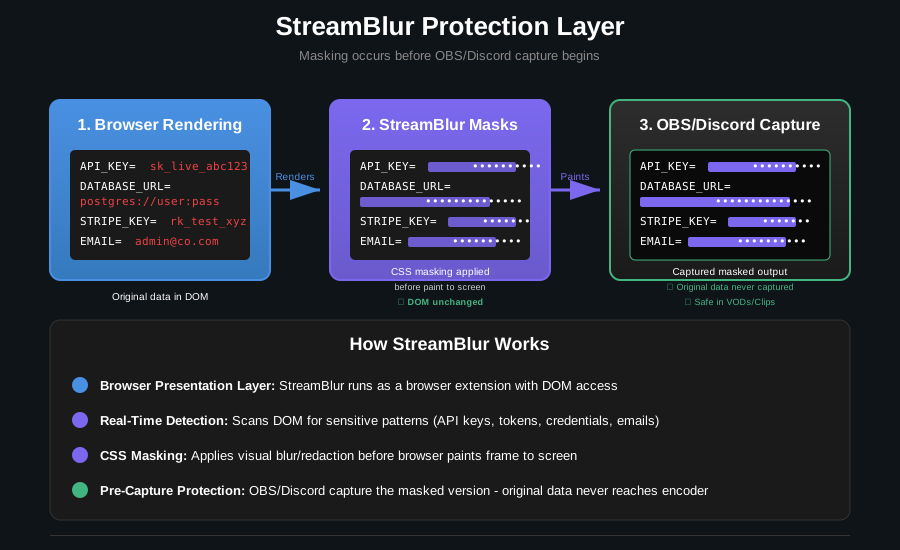
StreamBlur operates at the browser presentation layer, intercepting sensitive content before it is painted to the screen. Instead of modifying source data, network traffic, or application behavior, StreamBlur controls how sensitive elements are visually rendered using browser APIs and CSS transformations.
When StreamBlur detects sensitive patterns such as API keys, authentication tokens, credentials, email addresses, or private URLs, it applies CSS-based visual masking before the browser paints the frame to the screen. This architectural approach ensures that:
- OBS captures the masked version - the sensitive content never reaches the OBS encoder. The raw capture buffer contains only the masked visual output.
- Discord transmits the masked version - viewers in the Discord call never see the original sensitive data, only the masked representation.
- Twitch VODs and Clips store the masked version - no post-stream manual scrubbing or editing is required. The permanent record contains only masked content.
- The original data remains unchanged in the DOM and network layer - normal application functionality, copy-paste, form submissions, and API calls continue to work. The masking is purely visual.
The capture workflow remains unchanged. The broadcast software remains unchanged. The application behavior remains unchanged. Only the rendered output changes at the source, before capture occurs. This means StreamBlur works seamlessly with OBS, Discord, Zoom, Google Meet, or any other screen capture or streaming software without requiring configuration or integration.
This architectural approach moves privacy from manual vigilance (requiring the streamer to react fast enough) to structural protection (automatically enforced before capture begins). It eliminates the timing dependency that causes most stream privacy failures. Human reaction time is no longer the bottleneck. Protection occurs at the rendering layer, before OBS or Discord can capture the frame.
Why This Matters for Twitch Creators and Growing Channels
As Twitch channels grow from hobby projects to professional income sources, the stakes of privacy exposure increase proportionally. What begins as casual streaming to a few friends can scale to thousands of concurrent viewers, sponsorship deals, platform partnerships, and commercial brand relationships. At this scale, a single privacy mistake can have significant financial and reputational consequences.
- Audience size increases - more viewers means more eyes on every frame, higher Clip creation rate, and faster redistribution of mistakes across social media platforms.
- Clip distribution accelerates - viral Clips can reach millions of viewers outside the original broadcast context. A single mistake can be amplified across YouTube, Twitter, Reddit, and Discord communities within hours.
- VOD archives persist - Twitch stores VODs for 14-60 days depending on account type, but third-party archives, YouTube mirrors, and viewer recordings can preserve content indefinitely. Once a mistake enters the archive, it may be impossible to fully remove.
- Brand reputation becomes commercial value - sponsors, partnerships, and platform monetization programs depend on professional presentation, operational security, and consistent content quality. A single API key leak or revenue dashboard exposure can violate NDA terms, compromise sponsor relationships, or result in loss of platform partnership status.
At scale, streaming privacy is not just personal discipline or "being more careful during broadcasts." It becomes operational infrastructure. Professional streamers broadcasting 20-40 hours per week need systematic protection that does not depend on perfect human attention across multi-hour sessions. Manual vigilance is not sustainable at professional streaming volume.
A single API key leak can result in unauthorized access to production systems, fraudulent API usage charges, or data breaches affecting customers. A single email subject line exposure can reveal unreleased product launches, partnership negotiations, or confidential business discussions. A single revenue dashboard flash during a Twitch Creator Dashboard review can violate NDA terms with sponsors or platform partners, resulting in contract termination or legal action.
The safest point to manage sensitive information is before it enters the encoded frame. Once recorded and transmitted to Twitch or Discord, it is outside the streamer's control. Deleting VODs, issuing DMCA takedowns, or manually editing recordings cannot remove content that has already been clipped, archived, or redistributed by viewers. Prevention at the rendering layer is the only reliable defense against frame-level capture in live streaming workflows.
Stop leaking secrets on your next stream
StreamBlur automatically detects and masks API keys, passwords, and sensitive credentials the moment they appear on screen. No configuration. Works on every tab, every site.
Used by streamers, developers, and SaaS teams. Free tier covers GitHub & terminal. Pro unlocks every site.