
Why Cropping in OBS Does Not Prevent Data Exposure
A technical explanation of OBS crop filters, capture layers, and why layout masking is not privacy protection
Many Twitch streamers and Discord screen sharers rely on cropping in OBS to hide sensitive information. It feels intuitive: if viewers cannot see a portion of the screen, the data must be protected.
In practice, cropping changes layout. It does not change rendering behavior.
Understanding the difference is critical if you stream dashboards, Discord web, Google Cloud consoles, payment portals, or internal SaaS tools.
This misunderstanding has led to credential leaks on Twitch, YouTube Gaming, and Discord screen shares across thousands of channels. Developers assume that if a region is cropped out of the OBS scene, the data within that region is protected. The assumption breaks down the moment you understand how capture software actually works.
What Cropping in OBS Actually Does
OBS cropping works at the capture layer.
When you crop a source in OBS, you are telling OBS:
“Do not display this portion of the captured frame.”
The key detail: OBS has already captured the entire frame.
When OBS captures a Display, Window, or Browser source, it requests a frame buffer from the operating system. That buffer contains the fully rendered output of whatever is being captured. Cropping parameters are applied afterward during scene composition. The sensitive data has already entered the OBS pipeline by the time cropping takes effect.
StreamBlur addresses this by intercepting rendering at the browser layer. Instead of trusting layout controls to hide data after capture, it prevents the data from rendering visibly in the first place. OBS captures what the browser displays, and the browser displays a masked version of sensitive fields.
Cropping removes pixels from the final composition, but it does not stop the underlying application from rendering sensitive information.
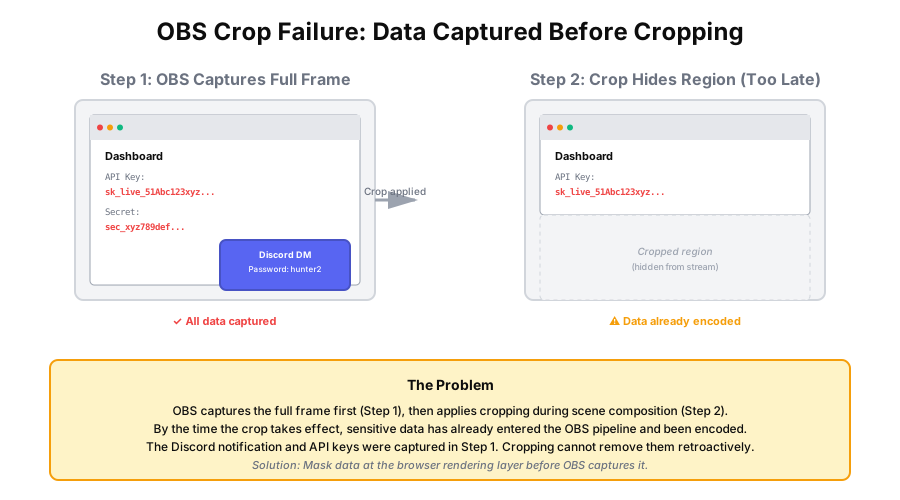
The data is still present in the captured frame before it is masked.
The Difference Between Rendering and Display
To understand exposure risk, separate these stages:
- Application renders content
- OBS captures rendered frame
- OBS composes scene
- OBS encodes and broadcasts
Consider a common streaming scenario: a developer is live coding and switches to their Stripe dashboard to check a transaction. They have carefully cropped the OBS scene to show only the top portion of their screen. The Stripe dashboard loads, and for 200 milliseconds, the full API key is visible in the uncropped browser viewport before they realize the window is positioned too low. OBS captured every frame. The crop did not prevent the exposure. It happened before the crop could take effect.
Cropping only affects stage 3.
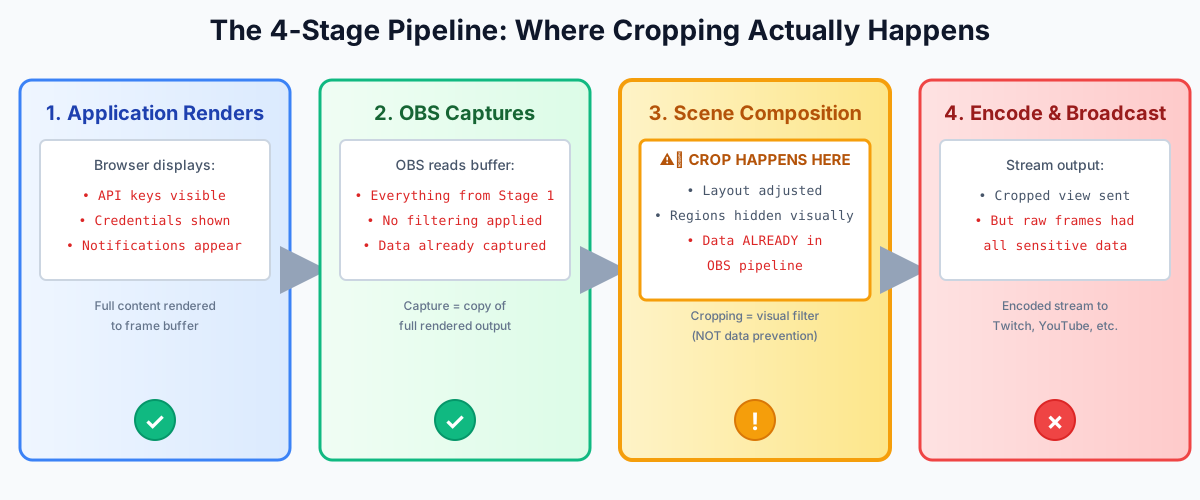
If a Discord DM, browser notification, or API key renders even briefly at stage 1, OBS can capture it at stage 2.
Cropping does not prevent rendering. It hides a region after capture.
That distinction matters.
Why This Creates Exposure Risk
Live streaming environments are dynamic:
At 60 frames per second, a single frame lasts 16.67 milliseconds. Human reaction time to visual stimuli averages 250 milliseconds. By the time a streamer notices that a credential has appeared outside the cropped region, 15 frames have already been captured and encoded. Those frames are in the stream buffer. Cropping cannot recall them.
- Alt-tabbing between browser tabs
- Opening SaaS dashboards
- Checking Stripe or PayPal
- Reviewing Twitch analytics
- Discord notifications sliding in
- Hover states revealing hidden text
Even if your layout is cropped carefully, unexpected UI states can render outside your intended safe zone.
Because OBS captures frames continuously, even a one-frame render can be encoded.
One second is not required.
One frame is enough.
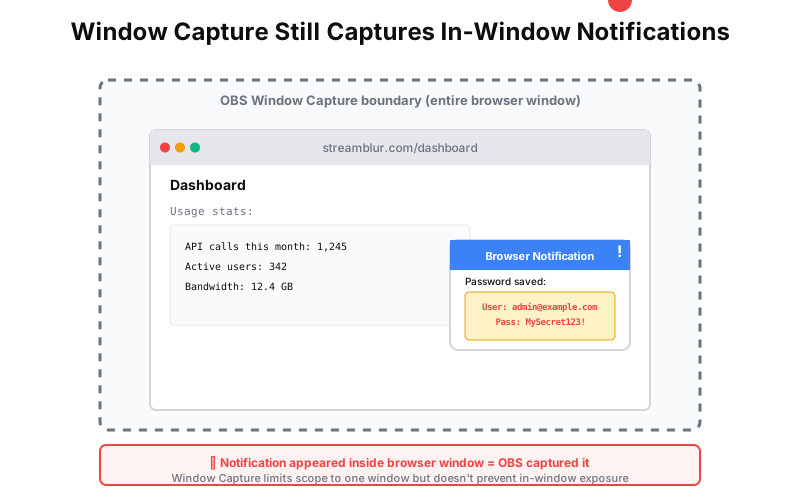
Window Capture in OBS is often recommended as a safer alternative to Display Capture because it limits the capture scope to a single application window. This reduces the chance of accidentally capturing a different window. However, it does not address in-window exposure. Browser notifications, autocomplete dropdowns, and modal dialogs all render within the captured window. If those elements contain sensitive data, Window Capture will capture them. StreamBlur works identically whether you use Display Capture or Window Capture because it operates at the browser rendering layer, not the OBS capture layer.
Common Misconceptions About OBS Cropping
“If it’s cropped, it can’t leak.” Cropping affects what is displayed in the final scene. It does not stop rendering at the source.
“I use Window Capture, so I’m safe.” Window Capture limits scope, but overlays and notifications can still render within that window.
“I tested it and nothing showed.” Testing static layouts does not account for live UI changes, pop-ups, or browser auto-fill suggestions.
Cropping excels when the content being hidden is predictable and static. Game HUDs, taskbars, and fixed UI panels are ideal candidates for OBS cropping. These elements do not change position or content dynamically during a stream. Sensitive data, by contrast, appears unpredictably. A developer does not plan to leak an API key. It happens because a dashboard loaded, a browser autofilled a field, or a notification appeared. Cropping cannot account for these events.
Cropping is a visual layout control. It is not a privacy control.
Why Pre-Stream Testing Does Not Catch Crop Failures
Many streamers test their OBS layout before going live. They open a few tabs, check the crop boundaries, and verify that sensitive regions are hidden. The test passes. The stream begins. Twenty minutes in, a browser notification appears outside the tested area. The credential leaks.
Static testing cannot account for dynamic events. A pre-stream test shows what the layout looks like at that specific moment. It does not show what happens when a Discord DM arrives, when a browser autofills a password field, or when a dashboard loads asynchronously and shifts layout unexpectedly. Live environments are not static. Cropping is.
This is why manual testing combined with crop-based protection creates a false sense of security. The streamer believes the layout is safe because the test passed. The vulnerability is not in the test. It is in the assumption that future UI states will match the tested state.
When Cropping Is Appropriate
Cropping is useful for:
- Removing static UI panels
- Cleaning up game borders
- Centering content
- Hiding predictable layout elements
The distinction between presentation-layer masking and capture-layer filtering is the difference between preventing a problem and reacting to it. OBS cropping is reactive. You configure the crop after identifying what needs to be hidden. StreamBlur is preventive. It scans for credential patterns continuously and masks them the moment they render. There is no configuration step. There is no manual crop adjustment. The protection is automatic and universal across every browser tab.
It is not designed to:
- Mask dynamic text fields
- Protect API keys
- Hide financial data
- Prevent accidental dashboard exposure
Those are rendering-layer problems.
The Structural Solution: Control Before Capture
The only reliable way to prevent sensitive data from appearing on stream is to manage it before it becomes part of the captured frame.
Twitch VODs and YouTube archives persist indefinitely unless manually deleted. A single-frame credential leak in a 4-hour stream becomes a permanent exposure risk. Viewers can scrub through the VOD, identify the frame, and extract the credential. Cropping does not prevent this. Once the frame is encoded into the VOD, the data is accessible. StreamBlur ensures that even if a credential appears on screen, the encoded frame contains only the masked version. The VOD is safe by default.
That means operating at the browser presentation layer rather than the OBS composition layer.
If sensitive elements are masked before rendering, OBS captures the masked version. The streaming workflow does not change. The output changes at the source.
StreamBlur is built specifically for this purpose. It applies real-time masking to browser-rendered elements so that sensitive fields are visually protected before OBS or Discord screen share can capture them.
This shifts privacy from reactive layout adjustments to structural control.
How Different OBS Capture Modes Handle Cropping
OBS offers multiple capture modes: Display Capture, Window Capture, and Browser Source. Each handles cropping slightly differently, but none of them prevent rendering-layer exposure.
Display Capture grabs the entire screen output and applies the crop during scene composition. If a notification appears anywhere on the screen, it is captured before cropping. Window Capture limits the scope to a single window but still captures the full window content before cropping. Browser Source renders a webpage directly inside OBS, and cropping works the same way. The crop is applied to the OBS scene, not to the source rendering.
The only mode that prevents exposure is one that does not exist in OBS: rendering-aware capture. This would require OBS to understand which elements on the page contain sensitive data and exclude them before capture. OBS does not have this capability. StreamBlur provides it by operating inside the browser itself. It scans the DOM for credential patterns and applies CSS masking before the rendered output is sent to OBS.
Cropping Across Streaming Platforms
The same limitations apply whether you stream to Twitch, YouTube, Discord, or use screen recording tools like Loom and Camtasia. All of these platforms capture frames from the operating system and encode them into video. Cropping happens during encoding or post-processing. The raw captured frames still contain the full content.
Discord screen sharing, for example, allows you to share a single window or your entire screen. If you share a browser window and a notification pops up inside that window, Discord captures it. There is no crop option in Discord. The only protection is to prevent the notification from rendering visibly in the first place.
This is why StreamBlur works universally. It does not matter whether you use OBS, Discord, Zoom, or any other screen capture tool. Because it operates at the browser rendering layer, the masked output is what every capture tool sees. The protection is platform-agnostic.
The shift from reactive layout controls to structural rendering protection represents a fundamental change in how streamers approach privacy. Instead of trusting manual configuration and hoping that unexpected UI states do not expose credentials, the protection is built into the rendering pipeline itself. Every credential that appears is automatically masked. Every tab benefits. Every capture tool sees the safe output.
Why This Matters for Professional Streamers
As Twitch channels grow, more tools are open during streams, more dashboards are accessed live, VOD archives persist indefinitely, and clips circulate independently. The exposure surface increases with workflow complexity.
Cropping is a useful production tool. It is not a privacy strategy. If you stream from browser-based tools, SaaS dashboards, Discord web, or cloud consoles, privacy must be addressed at the rendering stage, not after capture. Once encoded, control is lost.
Key Takeaways
Cropping in OBS modifies layout, operates after capture, does not prevent rendering, and cannot stop dynamic UI exposure.
Privacy protection requires pre-capture masking, rendering-layer control, and structural safeguards during live sessions.
In live streaming environments, the safest place to manage sensitive data is before it becomes part of the frame.
Stop leaking secrets on your next stream
StreamBlur automatically detects and masks API keys, passwords, and sensitive credentials the moment they appear on screen. No configuration. Works on every tab, every site.
Used by streamers, developers, and SaaS teams. Free tier covers GitHub & terminal. Pro unlocks every site.