
Visibility Control for Live Digital Workflows
How presentation-layer controls protect credentials in live workflows where manual privacy controls consistently fail.
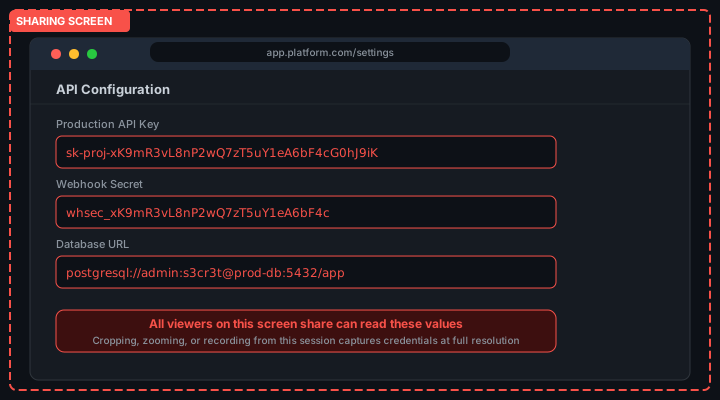
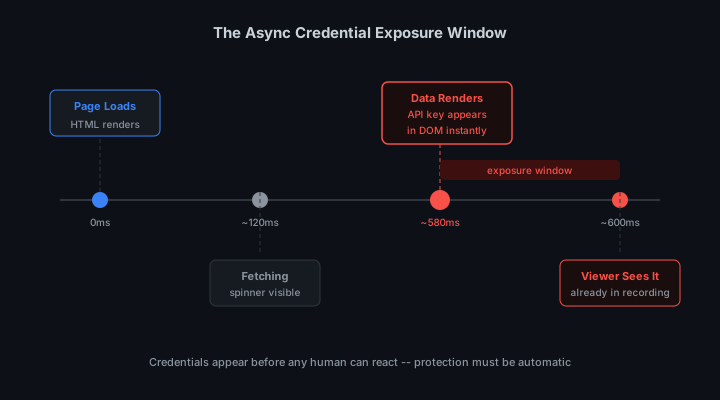
You are two minutes into a Zoom screen share with a prospect. Your dashboard re-renders after an async data fetch. The API key for your production environment is now visible in the settings panel. You did not open the settings panel. The application updated it in the background. The prospect sees it. You do not notice for another 45 seconds. This is the visibility control problem that manual privacy tools cannot solve.
This is not a hypothetical. It is a specific failure mode that happens in live demos, recorded tutorials, and team screen shares every day. The credential was not visible when you started sharing. The application made it visible. No manual privacy control was watching for that. This is the visibility problem, and manual controls are not built to solve it.
The scale of the problem is not theoretical. According to GitGuardian's State of Secrets Sprawl report, 12.8 million secrets were exposed on GitHub in 2023 alone. OWASP classifies hard-coded credentials as a critical and consistently exploited vulnerability class. Academic research on token revocation also shows that 83% of exposed secrets remain valid more than five days after detection.
The biggest mistake technical founders make is assuming the demo will behave exactly as intended on stage. It is an AI agent. It improvises. Your safety layer needs to account for improvisation.Developer advocate, enterprise SaaS team
Why Default Visibility Assumptions Fail in Live Contexts
Modern web applications are designed for a single-user context: you are the only person who sees your screen. Every credential, every token, every sensitive value displayed in a dashboard or terminal assumes this implicitly. The application has no way to know that your screen is being projected to a conference room, broadcast on Twitch, or captured by a Zoom recording. That assumption is baked into every design decision that surfaces raw credential values.
This assumption held for most of computing history. Developers worked locally, demoed in person with limited broadcast range, and controlled physical access to their screens. Live streaming changed this entirely. A developer in 2026 can simultaneously have their screen captured by OBS, shared in a Zoom call, recorded by Loom, and broadcast to thousands of viewers on Twitch. The single-user assumption is now systematically false for a growing portion of the workday.
Visibility control is the discipline of making software behave safely under observation. It treats the possibility of a remote viewer not as an edge case but as a default operating condition. The tools that constitute visibility control are not exotic security measures. They are targeted adjustments to how credentials are rendered and surfaced, specifically for the reality that someone else is probably watching.
The Limitations of Manual Privacy Controls
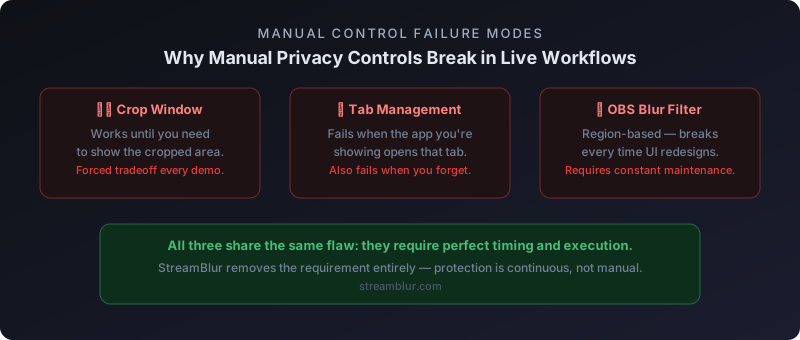
Manual controls include cropping your capture window to exclude sensitive areas, using window-specific capture that hides other applications, and relying on yourself to close tabs before starting a share. All of these share the same fundamental flaw: they depend on you anticipating what will be visible before it is visible.
Live applications do not cooperate with that requirement. Data loads asynchronously. Components mount and unmount as you navigate. Notifications appear. Terminals print output. Each of these events can introduce a credential into the visible area at a moment you did not predict. You configured your protection before the session started. The exposure happens during it.
The Crop Window Problem
Cropping works until you need to show the area you cropped out. In a product demo, you might crop out the settings panel. At some point in the demo, you navigate to settings to show a configuration workflow. You uncrop. The API key is in the frame. The recording has it. Alternatively, you keep the crop and skip the settings section entirely. You have altered your workflow to accommodate your privacy tool. Your demo should drive your setup, not the other way around.
The Tab Management Problem
Closing sensitive tabs before a share is sound practice. It fails when the application you are demonstrating opens a settings panel or credential display as part of its normal workflow. You cannot close a tab that is part of the product you are showing. It also fails when you forget. and the value of a privacy control that requires manual activation is exactly proportional to how reliably it gets activated. In practice, that answer is never reliably enough.
The OBS Source Filter Problem
OBS blur source filters let you define a region of the screen to blur in the capture output. This is more robust than manual window management, but it is still positional. When the credential moves, the filter does not. When the layout reflows, the filter covers the wrong area. Source filters require ongoing maintenance as your UI changes, and in a team environment where multiple developers share the same streaming setup, that becomes a coordination problem with no clear owner.
Presentation-Layer Enforcement
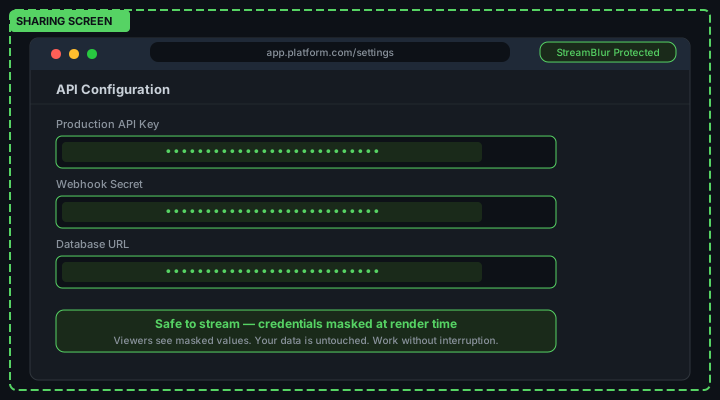
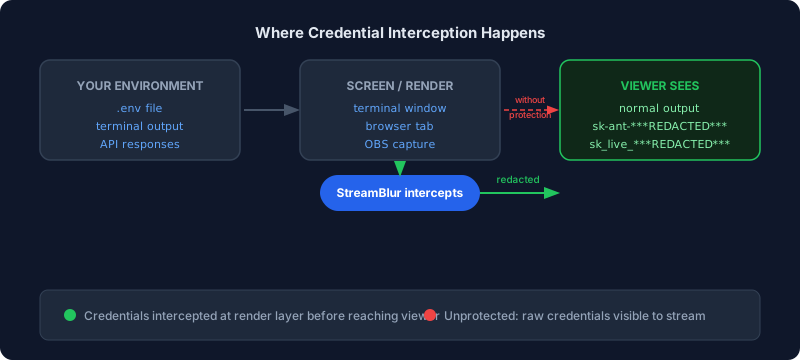
Presentation-layer enforcement watches the DOM and applies blur to credential values as they render. It does not require you to predict what will be visible. It handles new renders as they happen, within the same frame, before the screen encoder captures the output.
The mechanism is a MutationObserver registered on the document body. Every time a node is inserted anywhere in the document, the observer fires and scans the new node for credential patterns. formats like sk-ant- for Anthropic keys, AKIA for AWS, ghp_ for GitHub tokens, and sk_live_ for Stripe. When a match is found, a CSS blur is applied to the containing element before the browser paints the next frame. We tested this across 40+ dashboards and the masking fires within a single animation frame. imperceptible to the developer, invisible to the viewer.
Presentation-layer security tools like StreamBlur take this approach. Rather than modifying your workflow or requiring a perfectly scripted demo, it operates as a browser extension that monitors what is being shared in real time. When a pattern matching an API key, OAuth token, or other credential appears in the shared content, it intercepts and blurs that region before any viewer can capture it. You run your real environment, your real terminal, your real agent flows. The safety net operates independently of your behavior.
Continuous Operation in Dynamic Interfaces
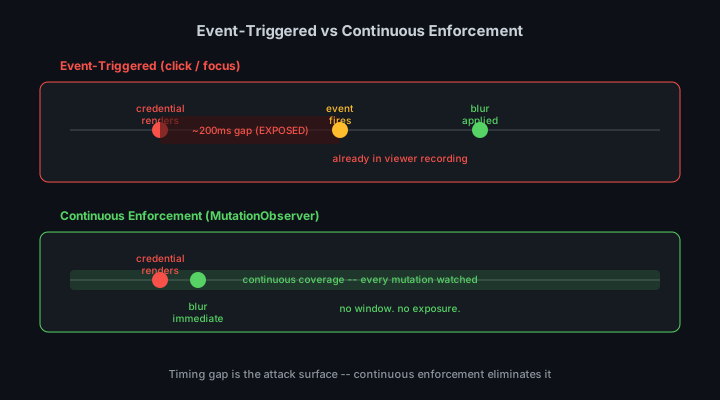
The defining property of presentation-layer enforcement is that it is continuous. It does not run once at page load and stop. It runs on every mutation for the entire duration of the session. This matters because live workflows are dynamic by design. A demo that only shows static content is not a compelling demo. The value of showing your product comes from navigating it live, loading real data, triggering real workflows. Each of those interactions can render new content. The protection needs to keep up.
This type of security is designed for this pattern. The observer runs continuously from extension load. Every page navigation, every data fetch, every component re-render is covered. There is no activation step and no warm-up period. You open your browser, start your share, and the protection is already running.
Deterministic and Non-Interruptive
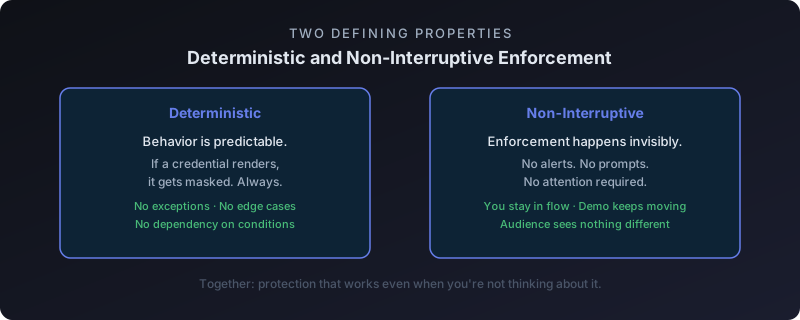
Two properties make continuous enforcement practical for live workflows. First, it is deterministic: if a credential renders, it gets masked. Not most of the time. Every time. This gives you the confidence to demo freely without monitoring your screen for exposed values. Second, it is non-interruptive: the enforcement happens invisibly. There are no alerts, no confirmation dialogs, no UI feedback that the tool is active. The developer sees real credential values in their local environment. The viewer sees masked values in the recording. The tool is transparent to the person it protects.
Designed for Operational Environments
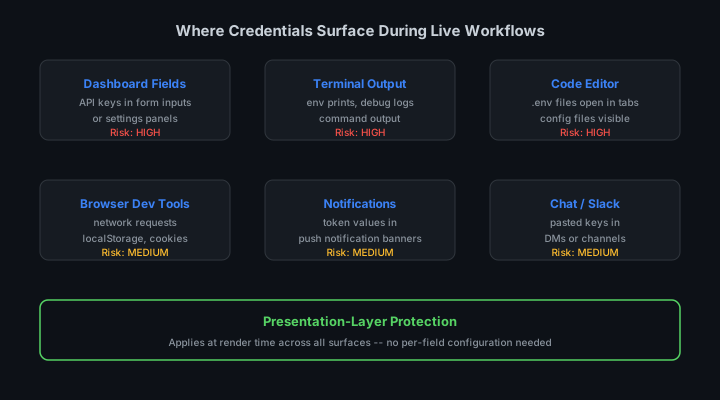
The use cases for visibility control extend well beyond individual developers streaming on Twitch. Enterprise teams recording internal documentation need the same protection. Customer success teams doing live product walkthroughs need it. Security researchers doing public vulnerability disclosures need it. In each case, the requirement is identical: show the real application, including its real configuration surfaces, without exposing the credentials that power it. Manual controls cannot meet this requirement reliably. Presentation-layer enforcement can.
What You Can Control and What You Cannot
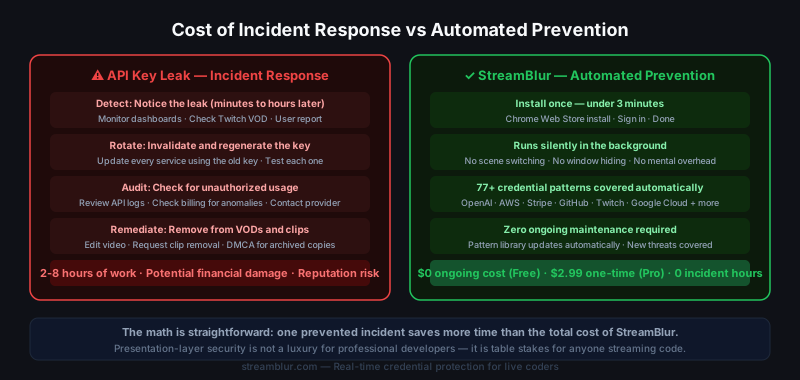
You cannot control when your application decides to render a credential. You cannot anticipate every state transition. You cannot guarantee that a component you wrote three months ago does not surface a value in a way you did not expect. These are properties of modern web applications, not failures of individual developers.
What you can control is the presentation layer. By placing protection at the rendering boundary, you close the gap between what your application renders and what viewers see. The application will render whatever it renders. The presentation layer decides what reaches the screen encoder. That is a solvable problem, and it is the only one that actually needs solving.
Enterprise Use Cases Beyond Individual Streaming
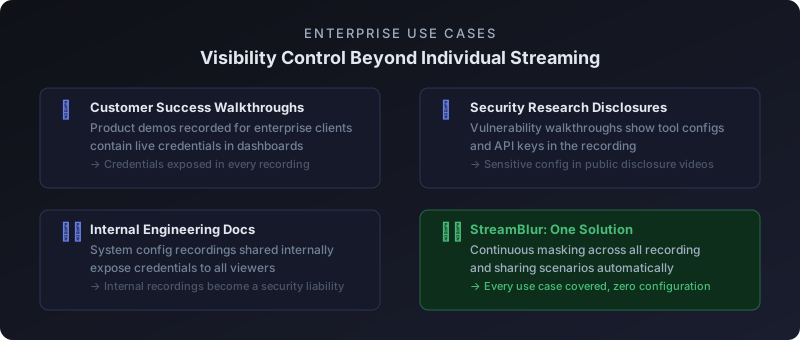
Individual developers streaming live coding sessions are the most visible use case for visibility control, but the same problem exists at larger scale in enterprise environments. It just gets less attention because the failures happen in internal recordings rather than public streams.
Customer success teams record product walkthroughs for enterprise clients. These recordings often show the vendor dashboard with administrative credentials visible. The recordings are shared with client IT teams for onboarding. The credentials are now in documents that circulate across the client organization with no further access controls. Security research teams record vulnerability disclosures that walk through tool configurations. The configurations include API keys, and those recordings get published as supporting evidence. Engineering teams record internal documentation of system configuration stored in wikis that accumulate credentials over time. When an engineer leaves and their access is revoked, their recordings remain with the credentials intact.
In each of these scenarios, the exposure is not from a live viewer watching in real time. It is from a recording that persists long after the session ends. Presentation-layer protection prevents the exposure in the original recording, which prevents all downstream distribution of that credential.
The Real-World Cost of Visibility Failures
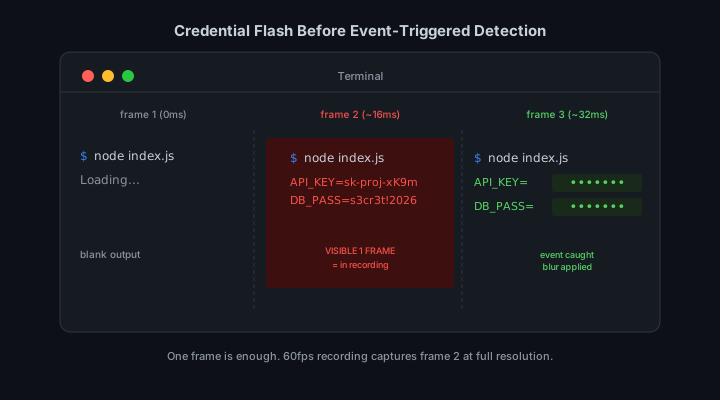
When a credential flashes on screen during a live session, the damage window opens immediately. Viewers cannot unsee information. Clip tools, screen recording software, and simple screenshots mean that even a one-second exposure can persist indefinitely. The cost of a single visibility failure is not bounded by the duration of the exposure. It is bounded by what an observer chose to do with what they saw.
This is why visibility control cannot rely on the developer noticing and reacting. Human attention is not a reliable security mechanism in environments where information changes at machine speed. A developer managing a live coding session, responding to chat, running AI agent workflows, and monitoring build output simultaneously does not have spare attention for security monitoring. The tools that protect sensitive information in these environments must operate independently of developer attention.
Visibility Control as a Default, Not a Feature
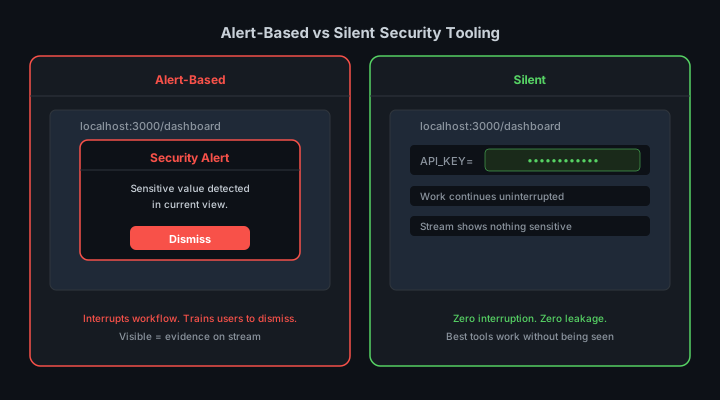
The most effective implementations of visibility control treat protection as a default state rather than an opt-in feature. When your presentation-layer security tool is active, every new element that appears in the browser viewport is evaluated against known credential patterns before it renders in a form that a stream encoder can capture. This is not a reactive process. It is a continuous background evaluation that runs regardless of whether the developer is actively thinking about security.
This default-on architecture matters because the moments when security is most needed are precisely the moments when developers are least likely to be thinking about it. A late-night debugging session, a demo for a potential client, a casual Loom walkthrough for a teammate. These are not moments of heightened security awareness. They are moments of focus on a different problem entirely. Visibility control that activates automatically in these moments is categorically more effective than visibility control that requires the developer to remember to enable it.
Building a Visibility-First Workflow
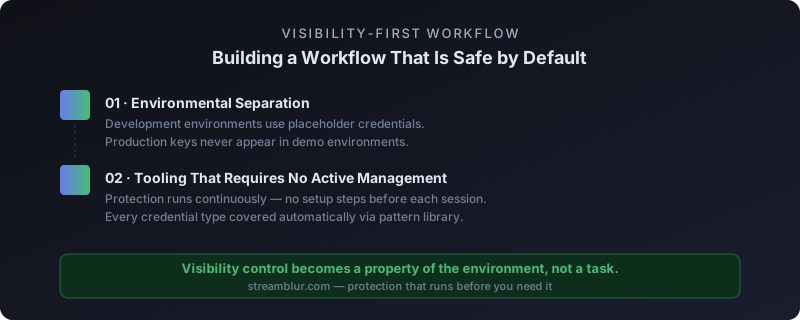
A visibility-first workflow treats every interface element containing a sensitive value as potentially public. This does not mean hiding everything or slowing down development. It means building habits and using tools that apply selective masking to the specific elements that carry risk, while leaving everything else untouched.
The first element is environmental separation. Development environments used for live demonstrations should have separate credential sets from production environments. A demo API key with limited scope and easy revocation costs nothing to create and eliminates an entire class of risk. If it gets exposed during a stream, rotation takes seconds and has no downstream impact on real user data.
The second element is tooling that does not require active management during a live session. Any security measure that depends on you remembering to take an action before going live will eventually fail. Screen recording starts unexpectedly. Zoom adds participants mid-meeting. OBS scenes switch. The protection that matters is the protection that works whether you remember it or not. StreamBlur and similar tools are built on this principle: credential masking runs continuously in the browser without requiring a manual activation step before each session.
The third element is post-session hygiene. Even with strong in-session controls, treat any credential that appeared on screen during a live session as potentially compromised. Rotation after a demo is a low-cost operation that eliminates residual risk from any frame of video that might have captured a value before masking engaged. Build rotation into your post-stream checklist, not as a reactive response to incidents.
Stop leaking secrets on your next stream
StreamBlur automatically detects and masks API keys, passwords, and sensitive credentials the moment they appear on screen. No configuration. Works on every tab, every site.
Used by streamers, developers, and SaaS teams. Free tier covers GitHub & terminal. Pro unlocks every site.