
Presentation-Layer Security: A Practical Alternative to Data Modification
Why modifying source data to protect live workflows creates more problems than it solves, and how presentation-layer protection works instead.
A developer is asked to protect sensitive values that appear in their company dashboard during screen recordings. The values are API keys used by the application. They need to be visible to authorized users working locally. They should not appear in recordings shared with external teams.
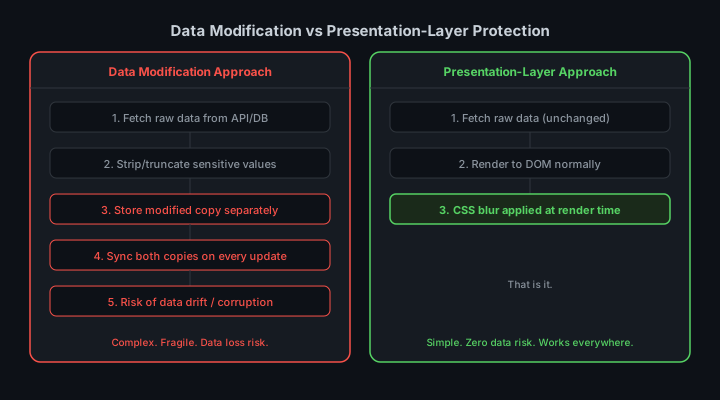
The first instinct is to modify the data. Truncate the keys before they reach the UI. Replace the middle characters with asterisks at the API layer. Store masked versions alongside the real values and serve the masked versions to the frontend. These approaches work in narrow cases and fail systematically in practice.
The Case Against Data Modification for Live Workflows
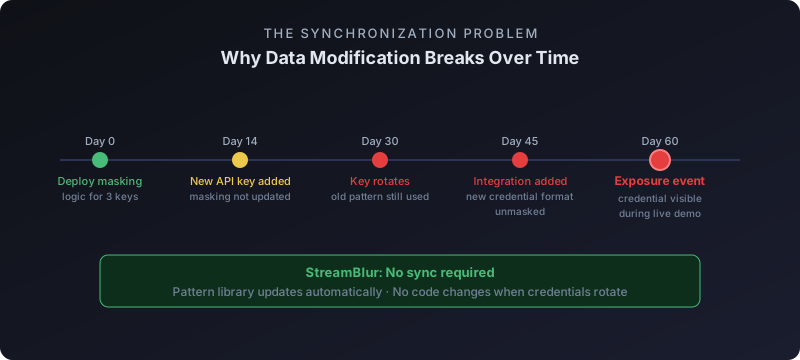
Data modification for display purposes introduces a secondary representation of your data. You now maintain two versions: the real value used by integrations and processes, and the masked value shown in the UI. These must stay in sync. When the real value rotates, the masked version must update. When a new field type is added, someone must remember to add masking logic for it.
The risk of drift is real. A developer adds a new API key field to a settings panel. The masking logic is not updated to cover it. The key is visible in the next screen recording. No error was thrown. No test failed. The system worked exactly as designed. The gap was in the scope of the masking logic, not in the code.
There is also a category of values that cannot be safely truncated without breaking functionality. Connection strings contain usernames, passwords, and hostnames. Truncating them for display means the displayed value cannot be used directly. A developer who copies the truncated value to test a connection gets a failure. This creates support overhead and erodes trust in the displayed values.
The Synchronization Problem
filter: blur() at the render edge — zero synchronization required.Consider a credential that rotates every 90 days. Your data layer holds the new value. Your masking layer must be updated to reflect it. In a simple system with one credential field this is manageable. In a real application with dozens of credential types across multiple services, the synchronization requirement grows with the number of fields.
Every new integration adds a new credential type that needs masking coverage. Every new service adds another sync requirement. The masking logic becomes a maintenance burden proportional to the breadth of your integrations.
How Presentation-Layer Protection Works
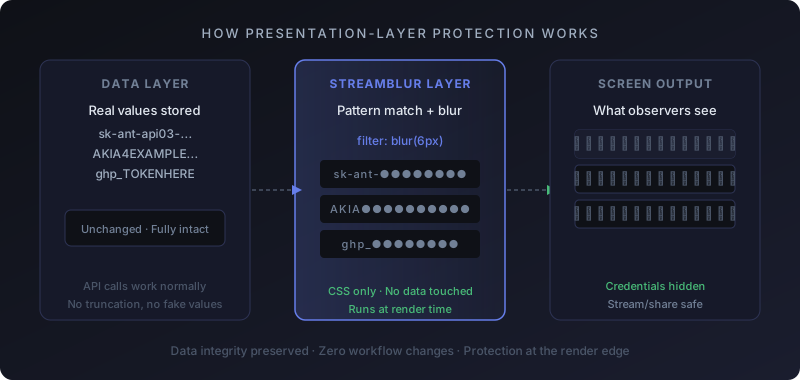
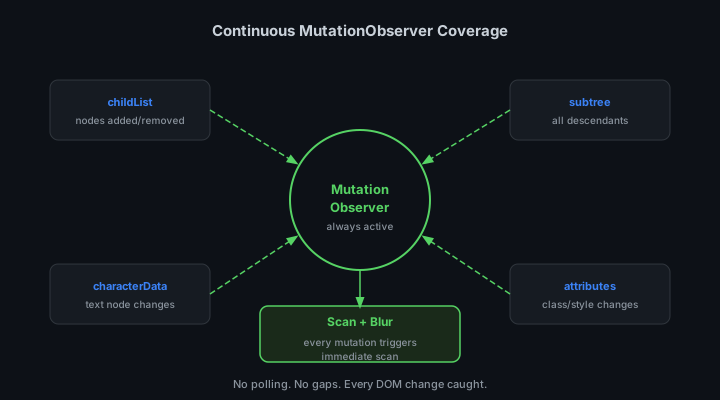
Presentation-layer protection does not touch the data. The API returns the real value. The application state holds the real value. The DOM contains the real value in a text node. The protection layer intercepts at the rendering step by applying a CSS filter to the element containing the text.
filter: blur(6px) on a span element blurs the rendered text without affecting the underlying DOM content. Screen capture software captures the rendered output, which is blurred. DevTools shows the real value. Copy-paste extracts the real value. Application code reading from the DOM gets the real value. Only the visual output seen by screen capture is affected.
/* The only change to the DOM */
.credential-masked {
  filter: blur(6px);
  user-select: none;
}

/* Applied dynamically -- original node unchanged */
// element.classList.add("credential-masked");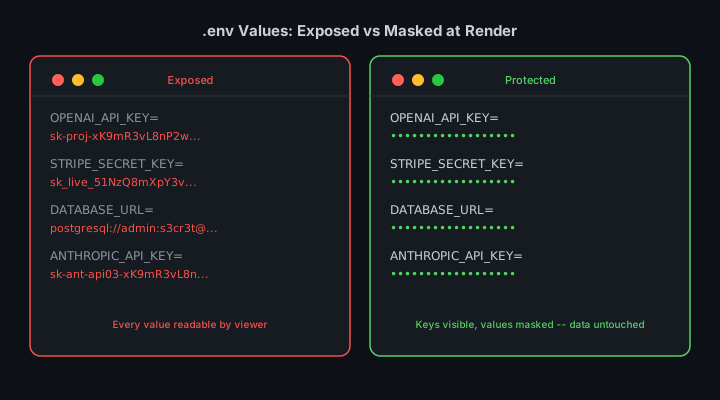
What Changes and What Does Not

What changes: the visual rendering of credential values in screen captures and video recordings.
What does not change: the data in your API responses, your application state, your database, your clipboard, or your DevTools inspector. There is no secondary representation. There is no sync requirement. There is no masking logic to maintain per field type.
The developer experience is unchanged. The credential is fully readable in DevTools. It can be copied and used normally. The protection is invisible during normal development work and active only in the rendered output that screen capture software sees.
Application in Live Workflows
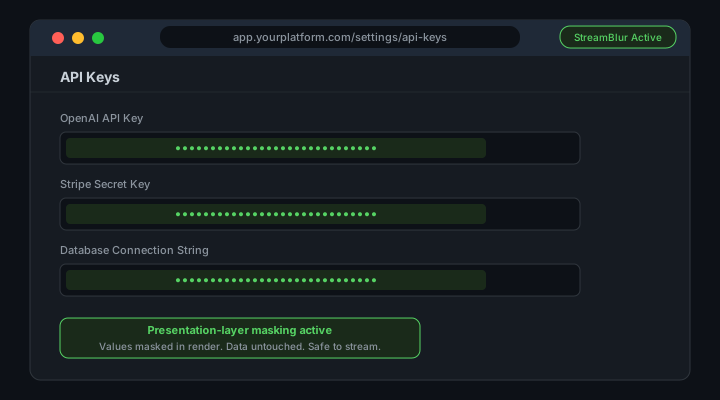
The practical difference becomes clear in a live demo scenario. A developer is sharing their screen and walks through the settings panel of their application. The settings panel shows three API keys.
With data modification, the keys are truncated server-side. The developer cannot read their full keys from the UI. They cannot verify which key is which by inspecting the last four characters. If they need to rotate a key, they cannot confirm the rotation from the settings panel. The masking that protects screen recordings also degrades the developer experience.
With presentation-layer protection, the keys are fully readable by the developer. Their local DevTools show the full values. They can verify, copy, and use the keys normally. Viewers watching the screen recording see blurred values. The protection is invisible to the developer and opaque to the viewer.
StreamBlur applies this approach at the browser extension level. No changes to your API layer. No database migrations. No per-field configuration. Install the extension, define your pattern library, and the presentation layer handles the rest.

Risk Reduction Without Workflow Redesign
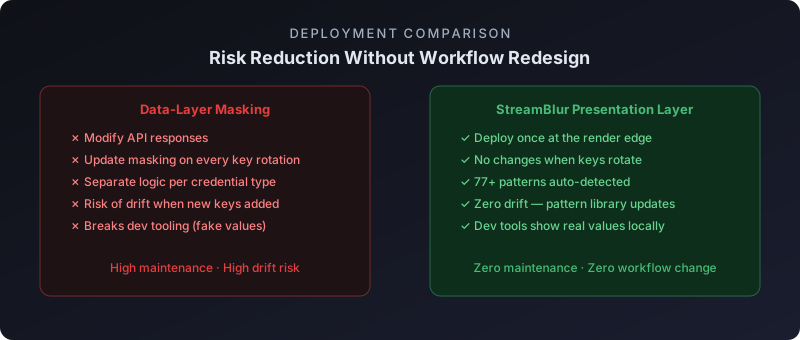
The practical argument for presentation-layer protection is that it reduces risk without requiring workflow changes. You do not need to redesign your API responses. You do not need to audit every field in every settings panel and add masking logic. You do not need to coordinate changes across frontend and backend teams.
You deploy the protection at the edge of the rendering pipeline and it handles the rest. New fields added to the UI are automatically covered if they match the pattern library. Fields you did not anticipate, third-party widgets, embedded iframes, terminal output, are also covered.
The scope of protection is the entire rendered page, not the list of fields someone thought to add masking logic for.
A Practical Architecture for Modern Interfaces
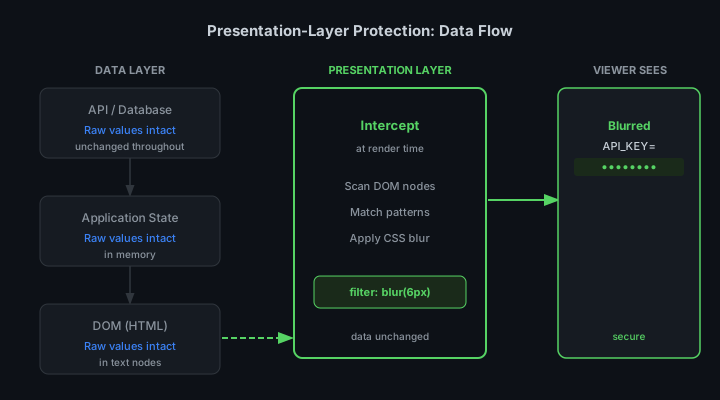
The pattern that emerges from these constraints is straightforward: keep data clean and use the presentation layer exclusively for masking.
The data layer serves real values. The application layer consumes real values. The presentation layer renders them and applies blur based on pattern matching. Screen captures see the blurred output. Users working locally see the real values.
This separation of concerns holds as the application grows. New data types do not require new masking logic in the API layer. New UI components are automatically covered. The protection layer is decoupled from the data model.

When Data Modification Is Still the Right Choice
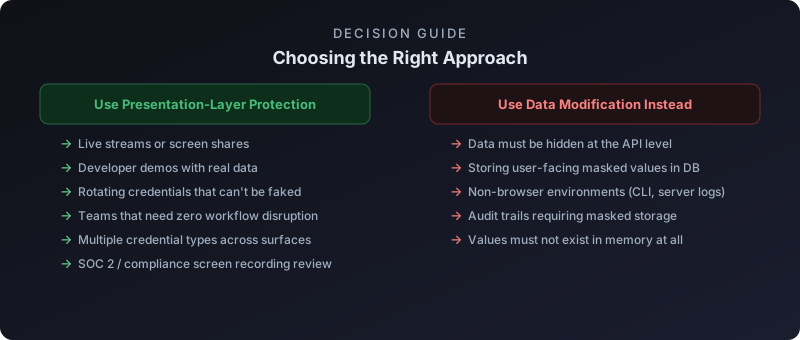
Presentation-layer protection is not the right tool for every situation. If you need to log user activity and the logs must not contain credential values, you need data-layer masking. If you are building an audit trail that must be credential-free at rest, presentation-layer protection does not help because it only affects rendered output.
The distinction is between protecting rendered output, which is what presentation-layer protection does, and protecting data in transit or at rest, which requires data-layer controls. For live streaming and screen recording scenarios, the rendered output is the attack surface. Presentation-layer protection addresses it directly.
Integrating with Existing Security Policies
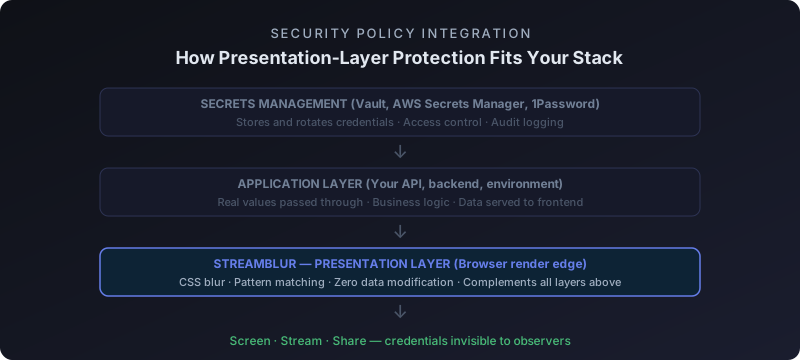
Presentation-layer protection complements existing security policies rather than replacing them. Credential rotation, least-privilege access, secrets management platforms, and audit logging all remain important. Presentation-layer protection addresses specifically the screen capture attack surface, which most security policies do not cover.
In organizations that have adopted secrets management platforms, credentials are ideally never stored in application configuration files or environment variables directly. They are fetched from the secrets manager at runtime. This does not prevent them from appearing in browser UI when the application surfaces them for administrative review. Presentation-layer protection covers this surface regardless of how the credential is stored upstream.
For organizations undergoing SOC 2 or ISO 27001 preparation, the question of screen recording controls comes up explicitly. Auditors ask about controls that prevent credential exposure in training materials, demos, and recorded meetings. Presentation-layer protection is a documentable technical control that addresses this requirement. The control is automated, does not depend on human behavior, and can be demonstrated with a screen recording of its own operation.
The Compliance Dimension of Presentation-Layer Security
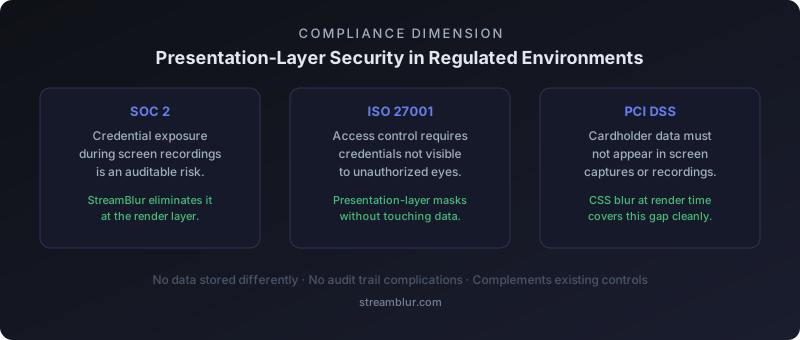
For developers working in regulated industries or with enterprise clients, the distinction between presentation-layer protection and data modification has compliance implications. Data modification approaches that alter credentials in storage, transmission, or processing pipelines can create audit trail complications. A system that replaces a real credential with a masked version at the data layer must account for where the real credential was stored, how the replacement was applied, and whether any intermediate systems received the unmasked value.
Presentation-layer protection avoids these complications by operating entirely outside the data layer. The credential in storage, in transit, and in memory is always the real value. Only the rendered representation changes. Audit logs accurately reflect that the real credential was used in the operation. There is no intermediate masked value to reconcile. For security auditors reviewing how credentials flow through a system, this transparency is preferable to a modified data pipeline that requires additional documentation to explain the transformation.
Deployment and Maintenance Overhead Compared to Data-Layer Approaches
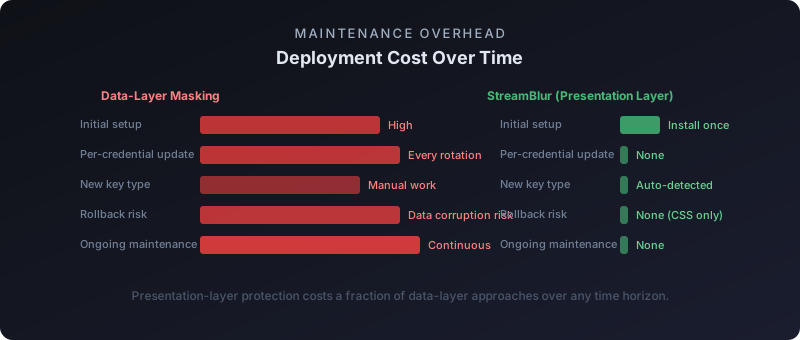
One of the underappreciated advantages of presentation-layer security is its deployment simplicity. A browser extension that masks credentials in the DOM can be installed in minutes and requires no changes to the applications it protects. There is no API integration, no backend modification, no environment variable change, and no deployment pipeline update required. The protection applies to any web-based application that renders credentials in the browser, regardless of how those applications are built.
Compare this to a data-layer masking approach, which typically requires modifying the application server to intercept and transform credential-containing responses, updating API clients to handle masked values, and maintaining a separate unmasking mechanism for legitimate uses of the credential. Each of these steps introduces implementation complexity and ongoing maintenance burden. StreamBlur is designed around the presentation-layer model precisely because zero-configuration protection that works immediately is more likely to be adopted and maintained than a complex integration that requires sustained engineering investment.
Deployment and Rollback Complexity
Data modification approaches to credential security, replacing real values with fake ones before a demo, carry a deployment complexity that is rarely accounted for in advance. You need a mechanism to swap values in, confirm the swap worked across all surfaces where the credential appears, run the demo, then swap the real values back without introducing errors. In a complex application with credentials appearing in multiple services, database connections, and third-party API calls, this swap-and-restore cycle is error-prone.
The failure mode is insidious: you swap in fake values for the demo, the demo works because the parts you tested with fake values function correctly, but a background service that was not tested with the fake values fails silently during the demo. You swap back the real values after, and everything works again, but the demo had a subtle bug that was not caught. Or worse, you forget to swap back one value, and the application runs with an incorrect credential until an unrelated failure surfaces the problem.
Presentation layer security eliminates this entire class of complexity. The real values remain in place throughout. The application functions with its actual credentials during the demo, which means the demo reflects genuine production behavior rather than a modified state. The masking layer ensures those credentials do not appear in the rendered output, but it does not touch the data layer at all. Rollback is a non-concept because nothing was changed.
When Presentation Layer Protection Is the Right Tool

Presentation layer protection is specifically suited to situations where you need to demonstrate real application behavior, not simulated behavior, while maintaining credential privacy in the visual output. This includes live coding streams where the development environment must work with real API integrations to demonstrate genuine functionality, conference talks where a working application response is more credible than a mocked one, and pair programming sessions where a colleague needs to see the full application behavior without seeing the underlying credentials.
It is not a substitute for proper credential management, environment isolation, or access control. A developer who exposes production credentials during a live stream has a credential management problem that presentation layer masking addresses at the display level but not at the access level. The credential was still used in a context where it should not have been. Presentation layer protection minimizes the damage of that exposure by ensuring the credential value is not captured in video or screenshots, but the correct response is also to rotate the credential after any session where it was active in a shared context.
StreamBlur occupies the presentation layer specifically. It masks what is displayed in the browser without modifying what the application sends to APIs, stores in databases, or logs to files. The masking is scoped to the visual output captured by the display. This is the right tool for credential safety during observed development sessions, combined with the right tooling at every other layer of the stack.
Stop leaking secrets on your next stream
StreamBlur automatically detects and masks API keys, passwords, and sensitive credentials the moment they appear on screen. No configuration. Works on every tab, every site.
Used by streamers, developers, and SaaS teams. Free tier covers GitHub & terminal. Pro unlocks every site.