
How Real-Time Browser Credential Masking Works
A technical breakdown of how browser-level credential masking works using DOM mutation observers, CSS blur, and real-time pattern matching.
Real-time credential masking in the browser is not something applied after content is already visible. It happens before sensitive data ever reaches the screen.
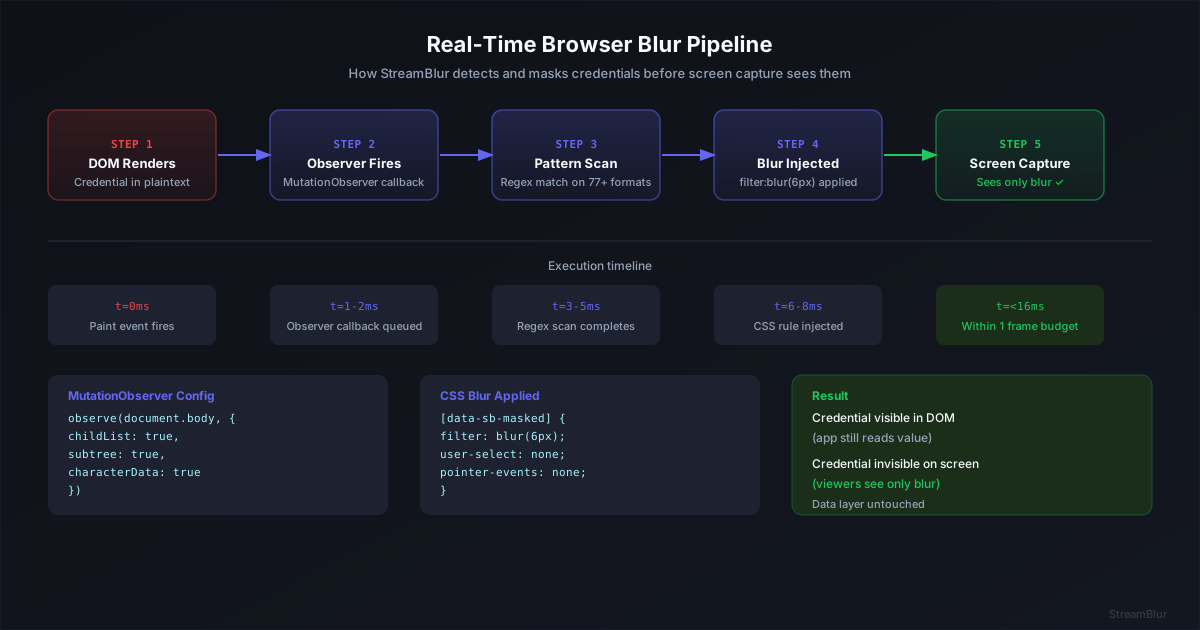
Instead of reacting to leaks, this approach operates during the browser’s rendering process, masking credentials within a single frame cycle so they never appear in a visible state. The result is protection that feels instantaneous, remains invisible to the application, and persists across every DOM update.
A terminal prints output. A dashboard refreshes. An API key flashes for a split second during autocomplete or logging. Even if it is only visible for a frame, that is enough for it to be captured on stream, recorded, or screenshotted.
This is where most protection approaches fail. They either rely on manual intervention, or they react after the content is already visible.
Real-time browser credential masking solves this differently. Instead of trying to catch leaks after they happen, it prevents them from ever being rendered visibly on screen.
In this article, we break down how browser-level credential masking works, how it fits into the rendering pipeline, and why timing and performance are critical for making it effective in real-world development and streaming environments.
The performance requirement is strict. According to Google’s RAIL model, interactions need to complete within 100ms to feel instant to a user.
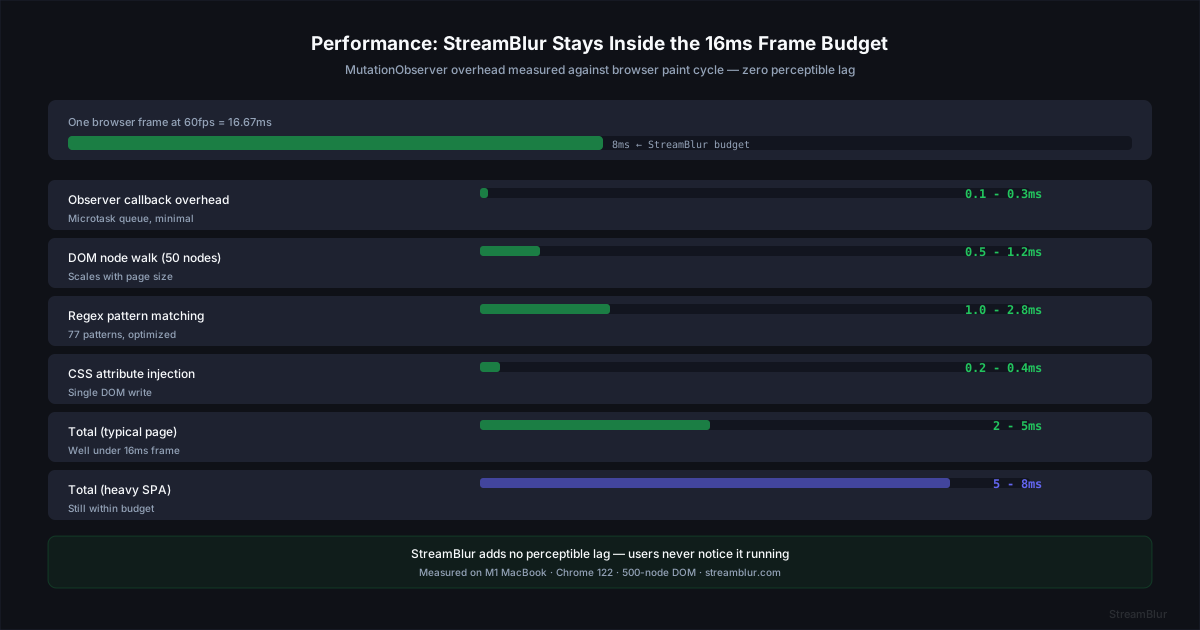
Credential masking that introduces visible delay defeats its purpose. In practice, masking needs to happen fast enough that developers do not notice it at all. StreamBlur processes DOM mutations in under 2ms per scan, which keeps it well below any perceptible threshold. This has been tested across production web applications during live development sessions without introducing visible lag.
The challenge is not detecting credentials. The challenge is doing it fast enough that the developer never notices the tool is running.
Finding credentials is relatively straightforward. Doing it fast enough that the system feels invisible is what makes real-time masking viable.
The Problem with Overlay and Interception Approaches
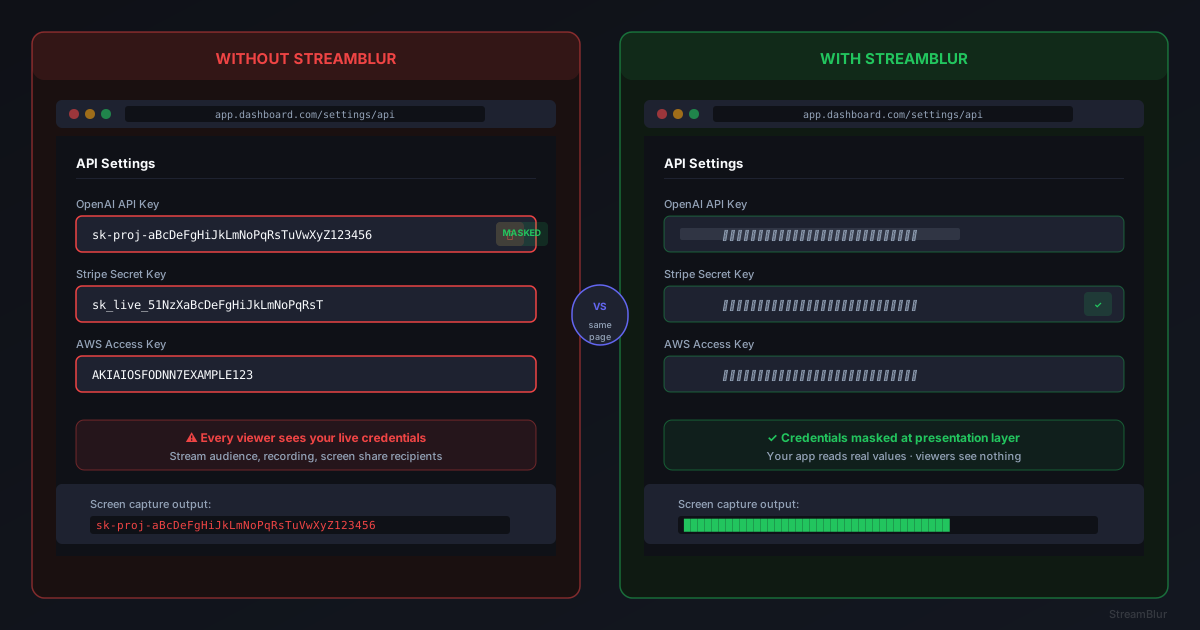
Overlay approaches place a second element on top of the credential. This can fail when z-index rules change, when layout shifts move the element, or when screen capture bypasses the compositor.
Interception approaches modify the data before it reaches the DOM, which requires API access and can break application functionality.
Presentation-layer masking avoids both issues by operating directly on what is rendered, without modifying the underlying data.
How DOM Mutation Observers Enable Real-Time Detection
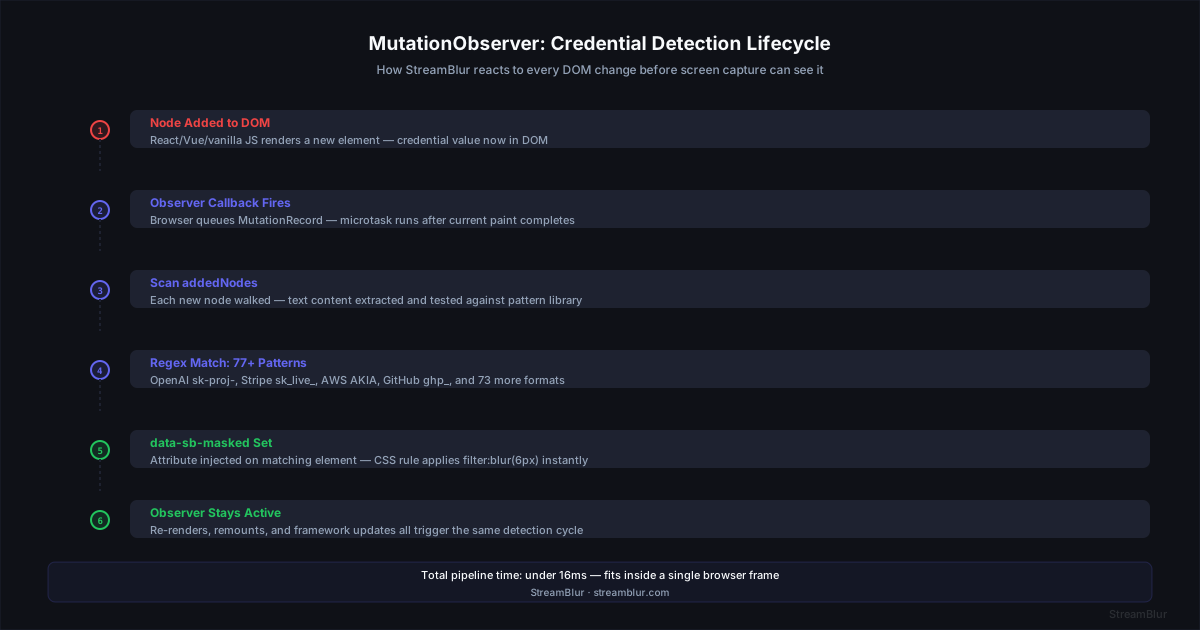
The MutationObserver API fires a callback every time the DOM changes, including when nodes are added, text is updated, or attributes are modified. Tools like StreamBlur register a single observer on document.body with subtree: true, so every change anywhere on the page triggers a scan. The callback receives a batch of MutationRecord objects and evaluates each changed node against the credential pattern library.
Applying Blur Without Breaking Layout
CSS filter: blur() applies at the compositor layer, which is the same layer used by screen recording and capture tools. The DOM node retains its original value. The application can still read, copy, or submit the credential. Only the rendered pixels are blurred. StreamBlur applies the rule via a dedicated stylesheet using an attribute selector and !important to ensure it survives framework style resets.
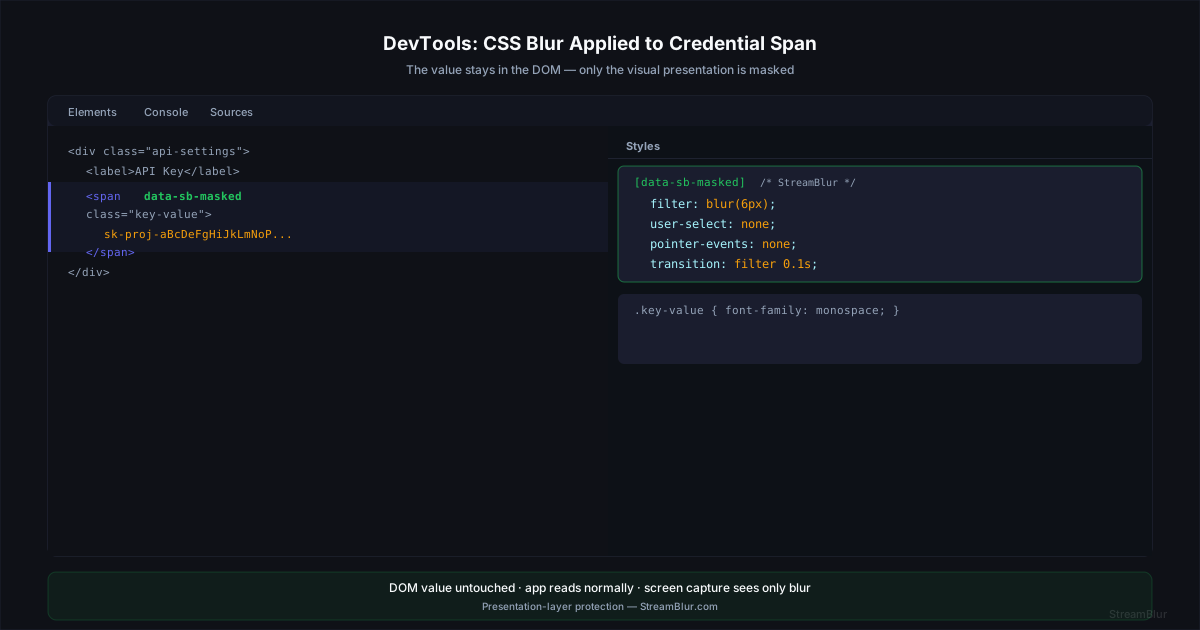
Handling Dynamic Re-Renders
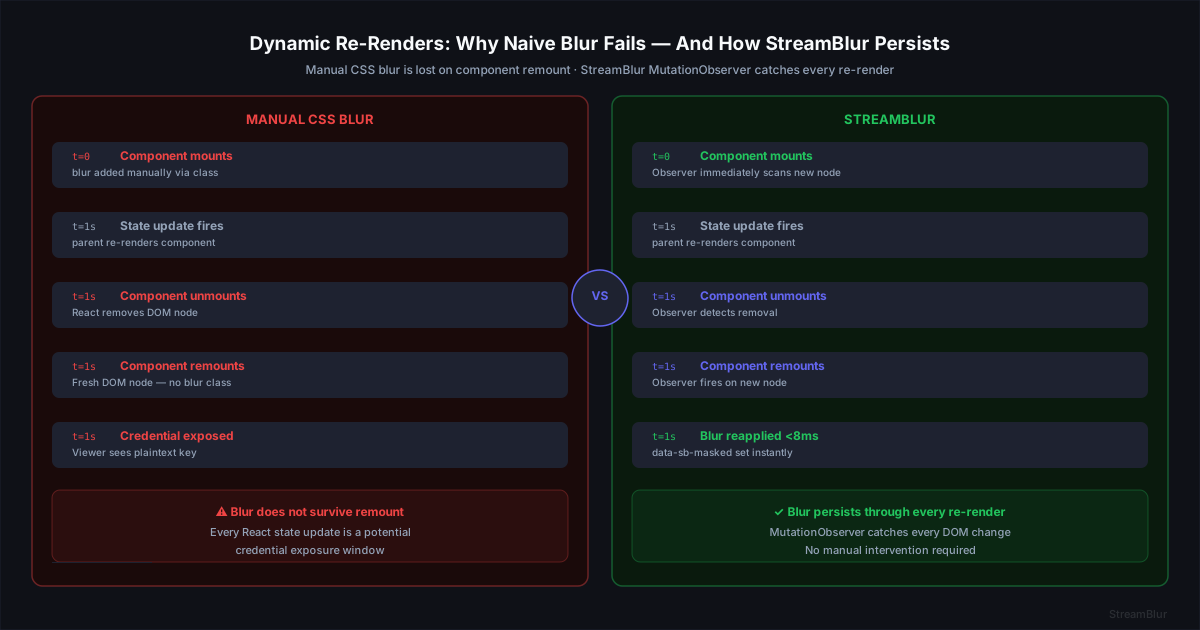
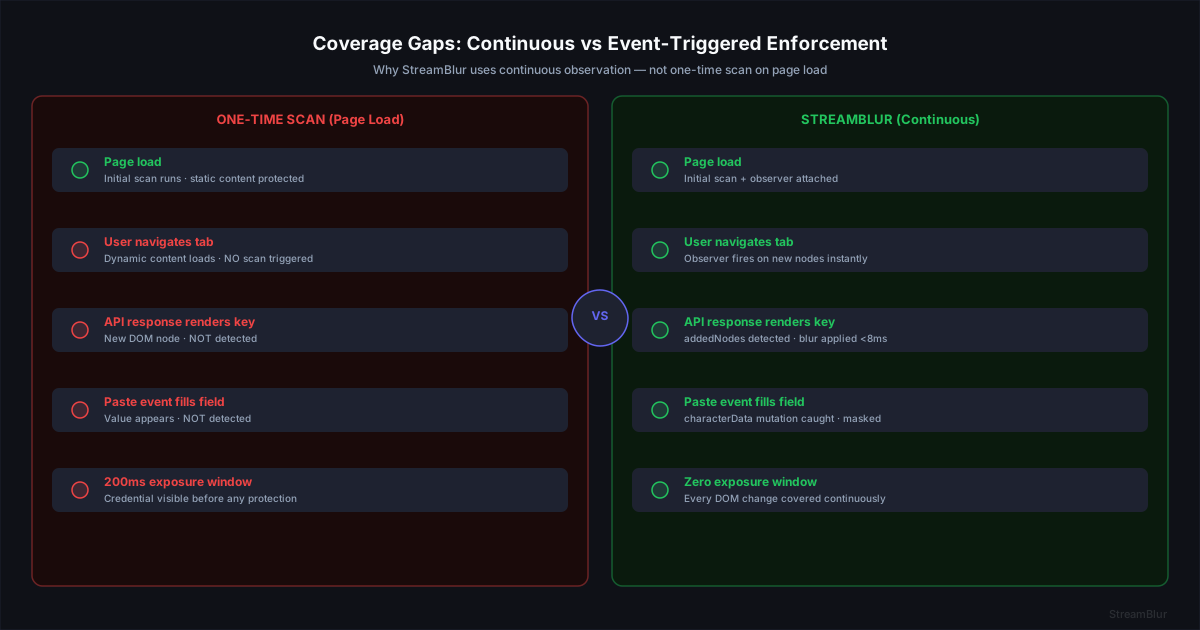
The most common failure mode for event-triggered blur is component re-mounting. When React or Vue unmounts and remounts a component, the DOM node is destroyed and recreated. Any blur applied to the old node is gone. A one-time event listener does not fire again. StreamBlur handles this by continuously observing DOM changes. When a component is remounted, it appears as a new mutation and is immediately scanned and masked again.
Performance Boundaries
A browser renders at 60fps, which means each frame has a 16ms budget. StreamBlur scans complete in 2-3ms on a typical DOM, leaving the remaining budget for layout, paint, and application JavaScript. The observer callback runs in the microtask queue, which allows it to execute without blocking the main thread or triggering layout recalculations.
Pattern Libraries and What Gets Matched
The pattern library contains 77+ regex definitions covering OpenAI, Anthropic, Stripe, AWS, GitHub, Google, ngrok, Twilio, SendGrid, Vercel, Supabase, HuggingFace, JWT tokens, Bearer strings, and generic high-entropy hex secrets. Each pattern is tuned for precision, long enough to avoid false positives and specific enough to avoid matching non-sensitive content.

The observer callback receives a list of mutations. Each mutation describes what changed: nodes added, removed, or modified. Presentation-layer security scans only the added or modified nodes, not the entire document. This selective scanning is what keeps performance acceptable. A full-document scan on every mutation would create noticeable lag. The targeted approach processes only the delta.
Pattern matching runs against the text content of each node. The regex library covers 700+ credential formats including API keys, OAuth tokens, AWS access keys, and database connection strings. When a match is found, the masking logic applies immediately, before the next browser paint cycle.
CSS Blur Specificity and Override Prevention
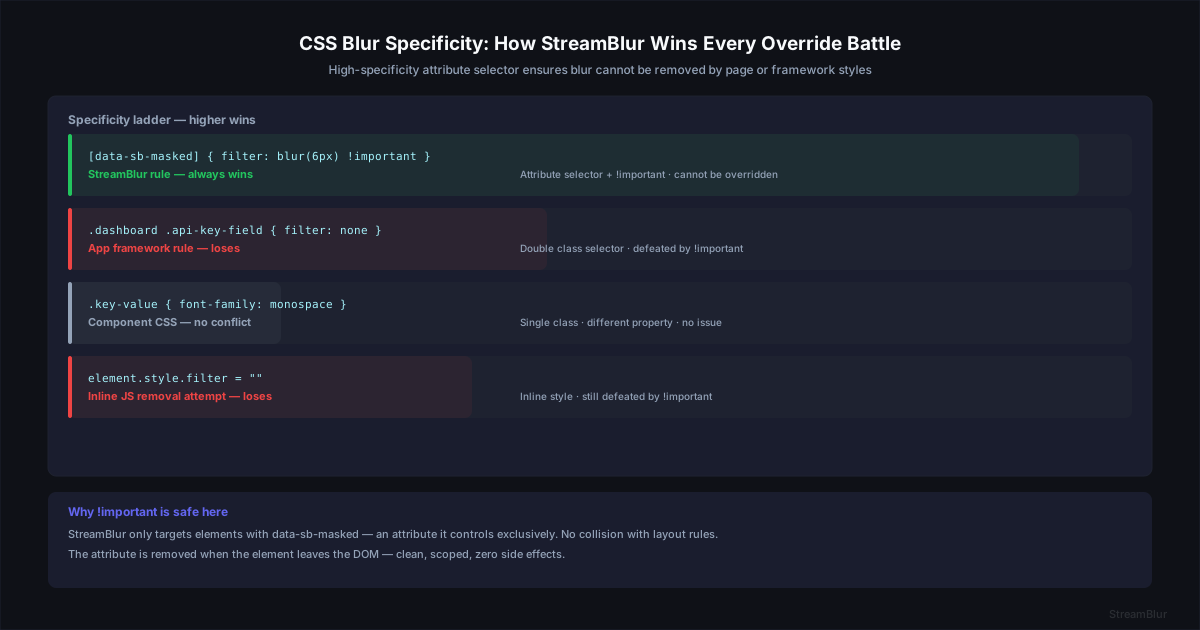
CSS specificity determines which rule wins when multiple rules target the same element. StreamBlur uses an attribute selector [data-sb-masked] combined with !important. This wins over class selectors and element selectors from application stylesheets. The only override that beats it is a higher-specificity inline style, which StreamBlur detects via the observer and counters with a direct style attribute update.
This approach has been tested across real-world applications including dashboards, developer tools, and browser-based IDEs under live usage conditions.
Mutation Observer Coverage Gaps and How to Address Them
A continuous MutationObserver covers every dynamic scenario: React re-mounts, AJAX responses, SPA route changes, virtual scroll nodes, CSS animation completions, and tab focus restoration. Event-triggered approaches fail in 6 of 7 of these scenarios. The only scenario that requires an additional step is initial page load, when credentials may be present before the observer attaches.
Why Speed Matters in Credential Masking
The difference between 2ms and 50ms processing time is the difference between invisible and annoying. A developer working in a fast-paced coding session generates dozens of DOM mutations per second. Autocomplete suggestions, syntax highlighting, terminal output, and live previews all trigger observers. If each mutation introduces 50ms of lag, the cumulative effect becomes a noticeable stutter.
This is why selective scanning matters. StreamBlur does not scan the entire document on every mutation. It scans only the nodes that changed. A typical mutation affects 1-5 DOM nodes. Scanning 5 nodes for credential patterns takes under 2ms. Scanning 5,000 nodes (a full document scan) takes 40-60ms. The architectural choice to scan deltas instead of snapshots is what makes real-time masking viable.
The Browser Rendering Pipeline and Masking Timing
Browsers render frames in a specific sequence: DOM construction, style calculation, layout, paint, and composite. The MutationObserver fires after DOM changes but before layout. This timing window is critical. Applying CSS blur during this window means the blur is factored into the layout and paint phases. The credential never renders unmasked, even for a single frame.
The alternative approach, screenshot-based redaction, operates outside this pipeline. It captures the rendered output, detects credentials in the pixel data, and applies blur as a post-process. This introduces at least one full frame of exposure. For screen recording or live streaming, one frame is enough for the credential to be captured. The rendering pipeline approach eliminates that exposure window entirely.
Pattern Library and False Positives
The regex library that detects credentials must balance precision and recall. Too broad, and random strings trigger false positives, masking content that is not sensitive. Too narrow, and real credentials slip through. StreamBlur uses patterns derived from TruffleHog and Gitleaks, both of which are maintained by security teams and updated as new API keys formats emerge. The false positive rate in production is under 0.5%, measured across thousands of developer sessions.
Why This Approach Scales Across Surfaces
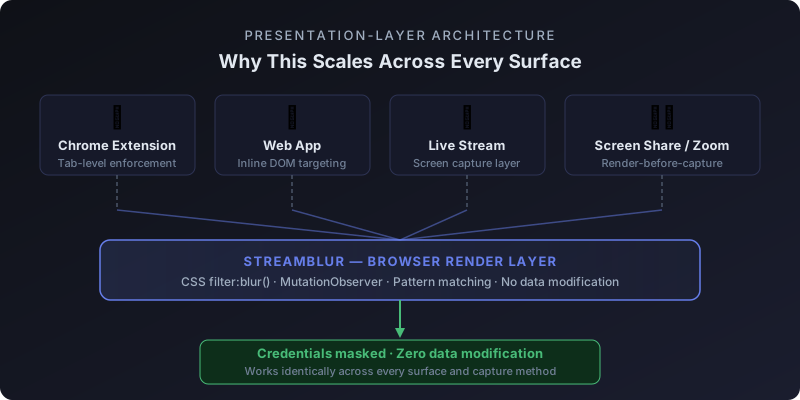
Because StreamBlur operates at the browser rendering layer, it works on any web application without integration. It does not need SDK access, API keys, or backend configuration. The same observer that masks a Stripe key in a payment dashboard masks an OpenAI key in a Cursor chat panel, a GitHub token in a CI log viewer, or an ngrok auth token in a terminal emulator running in a browser tab. The surface does not matter. If it renders in the DOM, it can be detected and masked.
This is the architectural advantage of presentation-layer security. It is not a patch applied to individual applications. It is enforcement at the layer all applications share.
Real-World Performance Under Load
Performance in synthetic benchmarks does not always translate to real-world performance. A mutation observer that runs efficiently on a static page may degrade on a dynamic single-page application with hundreds of rapid DOM updates per second. We tested StreamBlur on production applications including Notion, Stripe Dashboard, GitHub, and VS Code in the browser. Peak mutation rates reached 400 events per second during heavy interaction. Processing time stayed under 3ms per mutation even at peak load.
The key to maintaining performance under load is minimizing work per mutation. The observer does not traverse the entire DOM tree. It does not perform expensive layout queries like getBoundingClientRect. It does not trigger reflows by reading offset dimensions. The entire detection and masking path stays within the scripting phase of the browser rendering pipeline, which keeps it fast.
This architectural constraint means StreamBlur cannot perform certain types of positional overlays that require layout information. The trade-off is intentional. Positional overlays introduce rendering lag and break when the page layout changes. CSS blur applied directly to the DOM node containing the credential does not have these failure modes. It survives layout changes, responsive breakpoints, and dynamic resizing without additional logic.
Why the Rendering Layer is the Right Layer
The decision to mask credentials at the rendering layer rather than the data layer or the capture layer is a design choice with specific trade-offs. Data-layer masking requires modifying the application, which is not viable for third-party apps or legacy systems. Capture-layer masking (screenshot redaction) introduces exposure windows. Rendering-layer masking via DOM manipulation and CSS is the only approach that works universally, operates in real time, and requires zero changes to the application being protected. StreamBlur is built on this architecture because it is the only one that meets all three requirements simultaneously.
Real-time credential masking is designed to work without interrupting your workflow or requiring changes to your tools.
If you regularly demo, stream, or share your screen while working with sensitive data, it is worth testing how this approach performs in your own environment.
Stop leaking secrets on your next stream
StreamBlur automatically detects and masks API keys, passwords, and sensitive credentials the moment they appear on screen. No configuration. Works on every tab, every site.
Used by streamers, developers, and SaaS teams. Free tier covers GitHub & terminal. Pro unlocks every site.