
Claude Code Demo Patterns with Isolated Environments, Screen Control, and Privacy
We have been going through Claude Code demos, and a few patterns keep showing up for us.
PRO: The cleanest ones usually run in an isolated demo environment, control what surfaces on screen (terminals, dashboards, logs), and follow a simple flow instead of jumping around the codebase. CON: We also noticed a complete lack of back-up demo privacy. During streams, API keys, tokens, or internal URLs may flash on screen for just a split second without you even realizing it. This guide covers what actually works to prevent that.
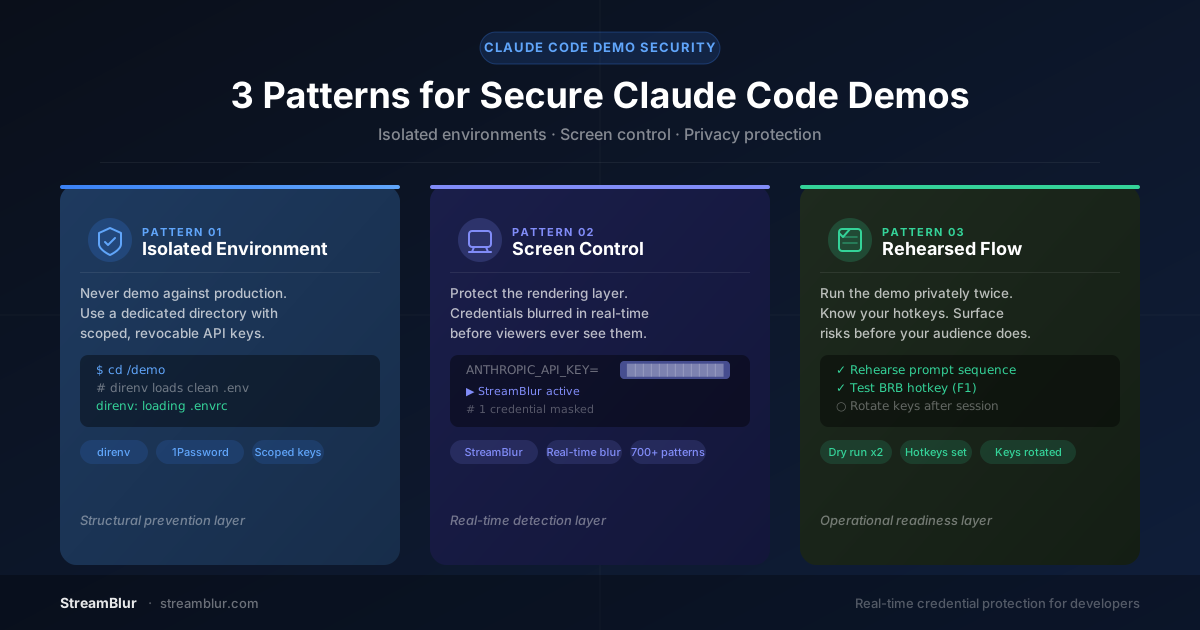
The Three Patterns That Separate Clean Demos from Risky Ones
Pattern One: Isolated Demo Environment
The cleanest Claude Code demos never run against production. They use a dedicated directory with scoped, revocable API keys, credentials that are rate-limited to the specific endpoints the demo needs and capped at spending levels that make them useless if captured.
Tools like direnv make this frictionless: a /demo folder automatically loads clean credentials when you cd into it. No manual key swapping, no risk of forgetting to switch back. The isolation is structural, not procedural.
The principle extends beyond API keys. Your demo directory should not contain production configs, client data, real database connection strings, or any file that Claude Code might read and summarize back to the terminal. The narrower the file tree the agent has access to, the smaller the surface area for unintended exposure.
Pattern Two: Controlling What Surfaces on Screen
This is the pattern most developers underestimate. Controlling screen output is not just about what you choose to show: it is about what Claude Code chooses to show on your behalf. The agent reads files, executes commands, parses configs, and echoes results to the terminal. Every one of those operations is a potential exposure vector.
The vectors that catch people most often:
Environment variable echoes. Claude runs printenv or inspects a config to understand your setup. All your credentials scroll past at once.
Error message leakage. A failed API call returns the calling key in the error body. Claude prints the full response to help you debug.
Git history exposure. Claude runs git log --patch and a prior commit surfaces a hardcoded secret that you thought was buried.
Config file inspection. The agent reads netlify.toml or a CI config looking for build context. Inline secrets are right there in the output.
Structural controls help: keep sensitive files out of the demo directory, clear terminal history before starting, use placeholder values in configs. But structural controls have a ceiling. You cannot fully predict what an autonomous agent will read and echo. This is why the best demos add a second layer.
The most effective approach is protection at the rendering layer: a tool that operates between what your screen displays and what your stream or screen share transmits to viewers. StreamBlur works this way, pattern-matching credentials in the rendered output in real time and blurring them before any viewer captures them. It covers the cases that structural prep misses: unexpected agent behavior, error messages with embedded keys, config values the agent surfaces for context.
Pattern Three: A Deliberate, Rehearsed Flow
The best Claude Code demos are not fully scripted, as that would defeat the point of showing an AI agent working. But they are rehearsed. The developer has run the exact prompt sequence privately, knows which files the agent is likely to read, and has thought through where the unexpected pivots might happen.
Rehearsal serves two purposes. First, it surfaces the exposure risks before the audience sees them. If Claude reads a config file during your dry run, it will likely read it during the live demo too . and you can decide in advance whether to restructure the prompt, move the file, or switch scenes at that moment.
Second, rehearsal makes you faster at recovery. If something unexpected does appear on screen, a developer who has rehearsed knows exactly which hotkey switches to the BRB scene, which credential needs rotating, and how to resume naturally. The audience barely notices.
A Practical Workflow for Claude Code Demos
Before you start: Switch to your isolated demo directory. Confirm your API keys are scoped and revocable. Run a pre-flight grep for secrets in your working directory: grep -rn -E "(sk-|pk-|AKIA|ghp_|Bearer|secret|api_key)" . | grep -v node_modules. Clear your terminal history.
Before you go live: Start StreamBlur or your equivalent rendering-layer protection. Verify it is active. Test your emergency scene-switch hotkey. Have a BRB scene ready.
During the demo: Follow your rehearsed prompt sequence. Watch for agent improvisation toward config files or diagnostic commands you did not plan for. If Claude takes an unexpected turn, pause and redirect before the output appears. Your rendering-layer protection is a backup, not a replacement for situational awareness.
After every public session: Rotate your demo API keys. Treat them as single-use regardless of whether anything appeared on screen. Most providers make this a two-minute operation. It is not optional.
What the Community Is Using
Based on patterns from developer streams and communities, the most common approaches combine several layers:
Environment isolation: direnv for per-directory env switching, 1Password Secrets Automation for runtime injection without disk writes, dedicated streaming machines or VM snapshots.
Pre-stream scanning: TruffleHog and Gitleaks for secrets detection in git history and working directories, OWASP hard-coded credentials guidelines for structural hygiene.
Real-time rendering protection: StreamBlur for live pattern-matching and blur at the rendering layer, covering the cases that structural prep cannot predict, including unexpected agent behavior and error message leakage.
Scene management: OBS Studio with dedicated BRB and privacy scenes, Stream Deck for instant hotkey switching, a small preview monitor showing exactly what viewers see.
The Underlying Principle
Claude Code demos are compelling precisely because they are not fully controlled. The agent improvises, solves problems in real time, and produces genuinely useful output in front of an audience. That autonomy is the point.
The developers who give the best demos are not the ones who restrict the agent into uselessness for safety. They are the ones who build an environment where the agent can work freely, and a protection layer that handles what the agent might unexpectedly surface.
Isolated environment plus rendering-layer protection plus a rehearsed flow. That is the pattern. Everything else is details.
Stop leaking secrets on your next stream
StreamBlur automatically detects and masks API keys, passwords, and sensitive credentials the moment they appear on screen. No configuration. Works on every tab, every site.
Used by streamers, developers, and SaaS teams. Free tier covers GitHub & terminal. Pro unlocks every site.